Mastering Data Preparation: A Comprehensive Guide to the New Introduction to Power Query Course

In the modern landscape of business intelligence and financial analysis, the sheer volume of data generated daily presents a formidable challenge for professionals across industries. Data preparation—often described as the hidden, grueling groundwork of analytics—frequently consumes up to 80% of an analyst’s time, leaving precious little room for actual strategic insight generation. To address this persistent industry bottleneck, advanced online educational platforms have increasingly focused on streamlining foundational data manipulation skills. Entering this vital educational space is a newly launched, comprehensive training program designed to demystify one of Microsoft’s most powerful analytical utilities: the Introduction to Power Query course.
Tailored for beginners, finance professionals, and seasoned Excel and Power BI users alike, this newly structured 5-hour, 100% online program offers a practical, analyst-friendly foundation. Its primary objective is to transition professionals away from error-prone, manual spreadsheet tinkering and toward building clean, automated, and repeatable workflows. As organizations globally transition toward automated cloud reporting and sophisticated dashboards, the ability to connect disparate data sources, cleanse anomalies, and reshape tables dynamically has evolved from a niche technical skill into an absolute career prerequisite.
The Evolution of Data Preparation and the Rise of Power Query
For decades, Microsoft Excel has served as the undisputed workhorse of corporate finance and data analysis. However, traditional Excel workflows relied heavily on manual copy-pasting, complex nested formulas, and fragile Visual Basic for Applications (VBA) macros that frequently broke when source data formats shifted. These manual processes introduced significant operational risks, including human error, version control issues, and a lack of auditability.
The introduction of Power Query—initially rolled out as an add-in and subsequently integrated natively into Microsoft Excel and Power BI—fundamentally transformed desktop data analytics. Power Query functions as a data extraction, transformation, and loading (ETL) tool. It allows users to discover data from a wide variety of sources, connect to them, and perform repeatable transformations. Crucially, every single action performed within the interface is recorded sequentially as a series of applied steps using the M query language, though users require zero coding knowledge to utilize the graphical user interface effectively.
Industry surveys consistently highlight data hygiene as the single most critical friction point in corporate financial modeling and business intelligence deployment. Analysts routinely spend countless hours stripping out blank rows, unpivoting cross-tabulated reports, merging disparate CSV files, and fixing date formats. By automating these repetitive chores, tools like Power Query not only accelerate reporting cycles but also dramatically enhance the reliability of corporate financial statements and management dashboards.
Course Structure and Curriculum Overview
Designed with flexibility and practical application in mind, the Introduction to Power Query course is structured into distinct, logical modules that take learners from absolute novices to confident practitioners capable of deploying automated workflows in their daily professional environments.
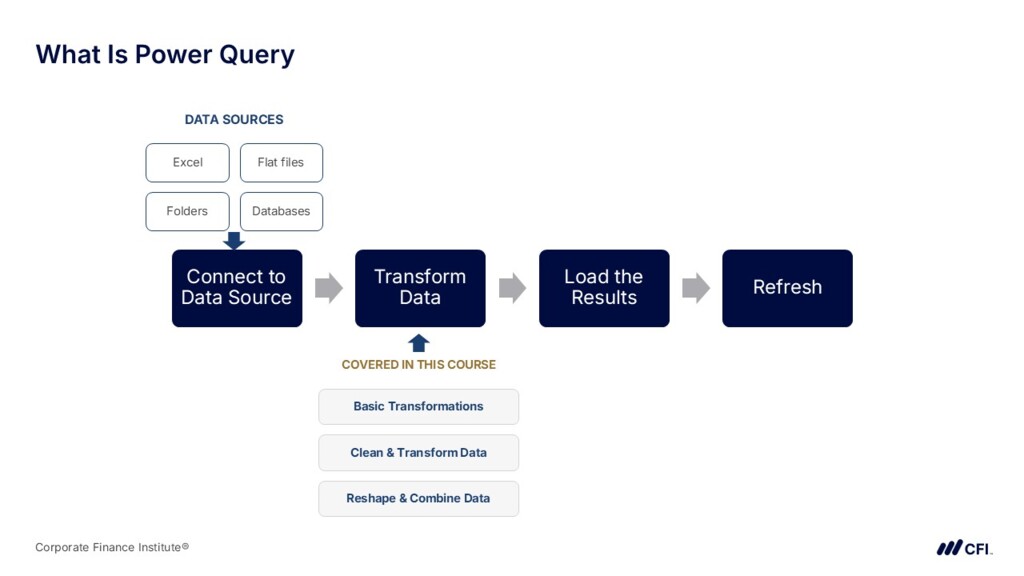
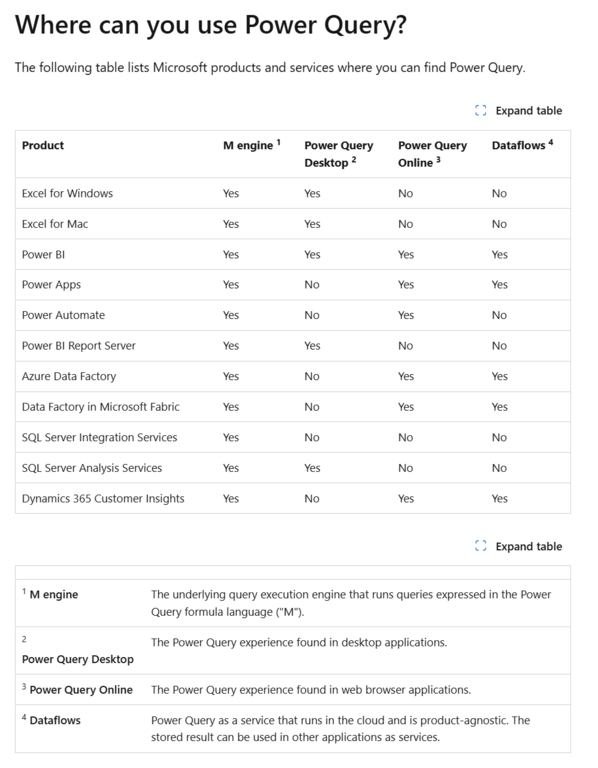
The curriculum begins with an essential introduction that establishes the theoretical and practical framework of ETL processes. Students are introduced to the Power Query Editor interface, learning how it interacts natively with Excel for Windows, Excel for Mac, and Microsoft Power BI. Given that software capabilities can vary slightly across platforms and version releases, the course emphasizes verifying technical compatibility before diving into hands-on exercises.
Moving past the introductory phase, learners progress to basic transformations. This module covers essential data manipulation techniques, such as promoting headers, changing data types, filtering rows, and selecting or removing specific columns. These foundational steps ensure that raw, unformatted data is immediately stabilized before deeper analytical cleaning takes place.
The third and most intensive segment focuses on cleaning and transforming messy data. Real-world data is notoriously imperfect, often containing leading or trailing whitespace, inconsistent capitalization, missing values, and corrupted text characters. Students learn systematic approaches to handling null values, splitting columns by delimiters, merging text strings, and creating conditional columns based on specific business logic.
As the curriculum advances, the focus shifts toward advanced reshaping and combining data. Analysts frequently encounter data stored across multiple sheets, workbook files, or external databases. This module trains participants in the art of appending datasets (stacking tables vertically) and merging datasets (joining tables horizontally using relational keys). Furthermore, learners master the critical technique of unpivoting columns—transforming wide, human-readable report formats into tall, database-friendly structures that analytical engines like Power BI and Excel’s Data Model require for optimal performance.
The penultimate module synthesizes these individual techniques into cohesive, repeatable workflows. Students discover how to connect Power Query to dynamic folder paths, enabling automated ingestion of monthly sales reports or financial ledgers simply by dropping new files into a designated directory. This capability eliminates the need to rebuild or adjust reports periodically, cutting recurring manual labor down to a single click of the "Refresh" button.
The course concludes with a comprehensive wrap-up and a rigorous qualified assessment. To earn their certificate of course completion, students must successfully pass an online examination consisting of multiple-choice questions, fill-in-the-blanks, and practical exercises, requiring a minimum passing score of 80 percent.
Target Audience and Career Integration Pathways
The Introduction to Power Query course has been strategically integrated into several high-demand professional credentialing programs, recognizing that data literacy is no longer confined to dedicated IT departments. It forms an integral component of the Business Essentials Certificate, the Data Analysis in Excel Specialization, the Business Intelligence Analyst Specialization, and the Financial Planning & Analysis (FP&A) Professional track.
Industry professionals who stand to benefit most from the curriculum include corporate finance analysts, accountants, business intelligence specialists, and administrative managers who find themselves trapped in monthly reporting loops characterized by manual data wrangling. According to early feedback from active platform members, the course bridges a crucial knowledge gap. Owen Crichlow, a recent student, noted that the transition from legacy fundamentals to the updated introductory curriculum introduced numerous immediately actionable techniques for his current role, while fellow student Henriques Da Costa emphasized the long-term career mobility afforded by mastering enterprise-grade data tools.
From an institutional standpoint, educational providers emphasize that technical prerequisites are kept minimal to encourage broad participation. Students require only a personal computer (PC or Mac), a stable internet connection, and Microsoft Suite (2016 or newer). Because the courses are hosted entirely online and operate on a self-paced model with yearly access subscriptions, working professionals can balance rigorous skill development with demanding corporate schedules.
Technical Requirements and Accreditation Standards
Ensuring a seamless learning experience requires careful attention to software ecosystem nuances. While Microsoft has steadily closed the feature gap between Excel for Windows, Excel for Mac, and Power BI, slight interface and functional discrepancies persist—particularly regarding legacy data connectors and advanced custom M-code writing. Prospective students are strongly encouraged to consult Microsoft’s official documentation on Power Query availability to verify that their specific software environment supports the required exercises.
Additionally, professional credibility remains a cornerstone of modern online executive education. Leading providers maintain rigorous institutional accreditations to ensure that hours spent studying translate into recognized professional development units. Many modules within these specialized tracks qualify for verified Continuing Professional Education (CPE) credits for Certified Public Accountant (CPA) charter holders, meeting the stringent standards set by organizations such as the National Association of State Boards of Accountancy (NASBA) in the United States and various CPA institutions in Canada.
Broader Impact and Implications for Modern Business Intelligence
The democratization of data analytics tools represents one of the most significant shifts in the modern corporate workplace. Historically, advanced data transformation required specialized database querying languages like SQL or dedicated ETL engineering software. Today, intuitive interfaces like Power Query place enterprise-grade data manipulation capabilities directly into the hands of financial analysts, marketers, and operational managers.
The economic implications of this technological shift are profound. Organizations that successfully train their workforce in automated data preparation report substantial reductions in reporting cycle times, lower error rates in financial reporting, and a marked shift in employee morale as staff transition from robotic data entry to high-value strategic interpretation. When financial analysts no longer spend the first three days of every month manually formatting spreadsheets, they can dedicate that time to variance analysis, forecasting, and strategic decision support.
Ultimately, the launch of focused, practical training initiatives like the Introduction to Power Query course underscores a broader industry consensus: technical proficiency in data handling is no longer optional. As businesses continue to accumulate digital information at an exponential rate, the competitive advantage will decisively belong to organizations whose personnel can rapidly transform raw, chaotic data into clean, actionable insight with the push of a button.