
Why Your Facebook Ads Are Not Delivering and How to Fix Them


Navigating the ecosystem of digital marketing often presents technical hurdles that can disrupt even the most meticulously planned campaigns. Among the most frequent grievances reported by media buyers and digital advertisers is logging into the Meta Ads Manager only to discover a flatlined delivery metric, rendering active campaigns completely invisible to their intended audiences. When an ad carries a "Not delivering" status accompanied by an "Update required" sub-status, it indicates that a technical or policy-based friction point has halted the dissemination of sponsored content. Understanding the root causes of these delivery failures is essential for maintaining campaign momentum and safeguarding return on ad spend (ROAS). Industry analysts note that sudden halts in ad delivery cost businesses millions in unrealized conversions annually, making rapid troubleshooting a core competency for modern marketing teams.
Understanding the Mechanics of Meta Ad Delivery Stoppages
To comprehend why ads fail to deliver, one must first examine how Meta’s delivery system operates. The platform utilizes an automated auction system where ads compete for impressions based on a combination of bid value, estimated action rates, and ad quality. When an ad stops delivering entirely, it means the system has either intentionally paused the campaign due to a rule violation, exhausted a predetermined financial boundary, or determined that the parameters provided by the advertiser make a successful auction entry mathematically impossible.
Historically, platforms like Meta have tightened their automated enforcement mechanisms to protect user experience and privacy. Consequently, minor oversights in budgeting, targeting parameters, or compliance can immediately trigger an algorithmic blackout. Media agencies frequently report that troubleshooting these issues requires a systematic audit of the entire ad account, moving from macro account-level settings down to micro creative elements.

1. Unavailable Associated Posts and Broken Permissions
A frequent catalyst for delivery failure involves the underlying organic post linked to an ad. Advertisers frequently utilize existing page posts to aggregate social proof—such as existing likes, comments, and shares—before turning them into sponsored units. However, if the original post is deleted, archived, or subjected to restricted privacy settings, the ad loses its structural anchor.
When this occurs, the Ads Manager typically flags the asset with an "Update required" notification.
Resolution Strategies:
Digital marketing technicians advise verifying that the target post remains publicly accessible on the associated Facebook Page or Instagram profile. If the post has been modified or restricted, advertisers must either restore the original permissions or select a fresh creative asset within the ad configuration menu. Once the adjustment is saved and the ad set is toggled back to an active state, the delivery system typically re-evaluates the asset and resumes normal impression distribution within minutes.
2. Extended Review Cycles and Policy Enforcement Timelines
Every piece of creative content submitted to the Meta platform undergoes a vetting procedure designed to enforce the company’s comprehensive advertising policies. This procedure combines machine learning algorithms with human moderation teams. According to Meta’s published merchant guidelines, the vast majority of advertisements are processed within a 24-hour window. However, systemic backlogs during high-volume commercial periods—such as Black Friday, Cyber Monday, and major global holiday seasons—frequently extend this review period significantly.
Furthermore, making substantive edits to an ad that is currently active or scheduled—such as altering the destination URL, modifying the primary text, or changing the visual creative—automatically invalidates its previous approval status. This forces the algorithm to pull the ad from circulation and place it back at the end of the review queue.
Resolution Strategies:
Experienced media buyers mitigate this risk by building advanced approval buffers into their campaign launch calendars, submitting creatives at least 48 to 72 hours before the intended go-live date. Crucially, campaign managers are advised to maintain a strict "hands-off" policy regarding active ads, avoiding any edits to pending or newly approved assets until historical performance data has stabilized.
3. Strict Ad Rejections and Policy Compliance
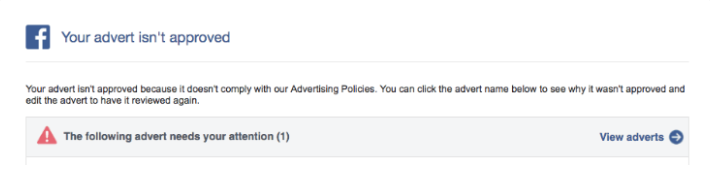
When an advertisement violates platform regulations—ranging from prohibited product categories and misleading claims to sensationalized language or intellectual property infringements—the system issues a formal rejection. Advertisers are notified via email and through the account quality dashboard within Ads Manager. Meta’s automated scanners evaluate not only the ad copy and imagery but also the destination landing page. If a landing page contains broken links, deceptive headlines, or products that diverge from the ad’s core premise, the entire campaign will be blocked.
Additionally, special ad categories—such as housing, employment, credit, and social issues—impose strict limitations on demographic and geographic targeting to prevent discriminatory practices. Advertisers failing to properly categorize these campaigns often experience immediate delivery suppression.
Resolution Strategies:
Upon receiving a rejection notice, marketers must review the specific policy clause cited by the platform. If the rejection stems from copywriting infractions, revising the text to remove non-compliant phrasing and resubmitting the ad usually resolves the issue. If the advertiser believes the rejection was executed in error by the automated system, a formal appeal can be initiated directly through the Account Quality center, prompting a manual review by human support staff.
4. Reaching Account-Level Spending Ceilings
Account spending limits represent a macro-level financial safeguard established either by the advertiser or automatically by the platform to prevent runaway expenditures. Once the cumulative spend across all campaigns within a specific ad account reaches this predefined threshold, the system immediately ceases delivering all active advertisements, regardless of their individual budgets or performance metrics.
This issue frequently affects long-running accounts where a legacy spending cap was established years prior and subsequently forgotten as business volume scaled.
Resolution Strategies:
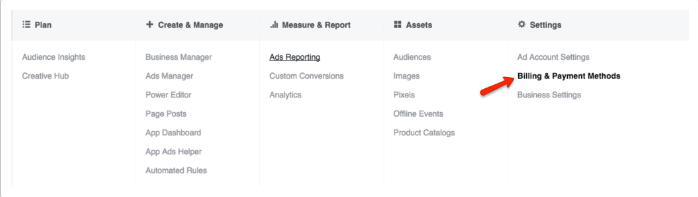
To rectify this, administrators must navigate to the billing and payment settings within Ads Manager to inspect the current account spending limit relative to historical expenditure. By resetting, increasing, or entirely removing the account spending limit, advertisers allow the system to instantly re-enter the auction, restoring ad delivery across all active campaigns.

5. Inadequate Budgeting and Restrictive Bid Caps
The mathematical relationship between an advertiser’s financial commitment and audience size dictates whether an ad can successfully participate in auctions. Setting an excessively low daily budget—such as a few dollars targeting a broad demographic—prevents Meta’s machine learning algorithm from gathering sufficient statistical data. Without enough conversion signals, the algorithm de-prioritizes the ad to preserve platform resources.
Similarly, implementing rigid manual bid caps that fall significantly below current market clearing prices prevents the ad from winning auctions, resulting in zero impressions.
Resolution Strategies:
Marketing analysts recommend utilizing lifetime budgets paired with automated bidding strategies (such as "lowest cost") during the initial phases of a campaign. This grants the algorithm the financial flexibility required to test audience segments effectively before transitioning to manual bid controls once a stable baseline cost-per-acquisition has been established.
6. Overly Narrow Audience Parameters
While hyper-segmentation is a powerful tool for precision marketing, excessively restricted audience definitions can paralyze delivery. Meta’s algorithmic delivery system generally requires a minimum addressable pool of approximately 1,000 active users within a designated target set to function efficiently. If custom audience lists are too small, or if layered demographic and interest exclusions reduce the potential reach below viable thresholds, the system cannot assemble enough auction opportunities.
Resolution Strategies:
To overcome audience exhaustion or restricted delivery, advertisers should broaden their targeting parameters. Recommended tactics include expanding geographic radiuses, relaxing strict interest exclusions, enabling Advantage+ audience expansion features, and creating larger lookalike audiences derived from high-value customer conversion data.
7. High Auction Overlap and Internal Competition
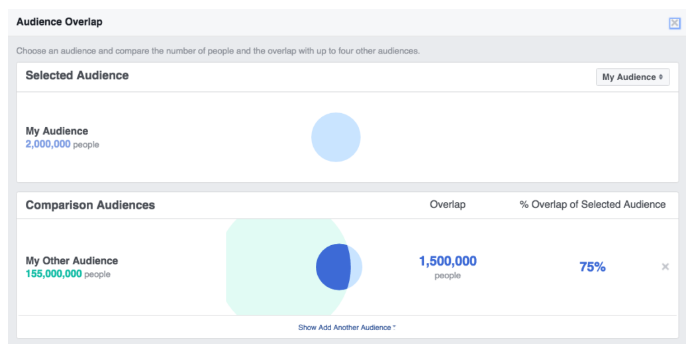
When an organization operates multiple ad sets targeting overlapping or identical demographic segments, the accounts enter an internal conflict known as auction overlap. To prevent an advertiser from bidding against themselves and artificially inflating their own costs, Meta’s auction system evaluates the total value of competing ad sets from the same account. The system automatically prioritizes the ad set with the highest projected performance value while suppressing or pausing the delivery of weaker overlapping units.
Resolution Strategies:
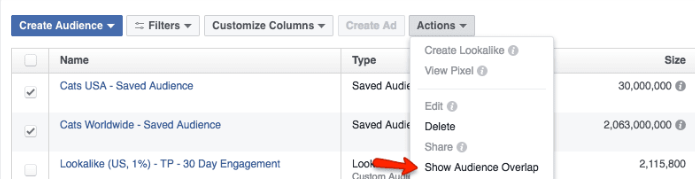
Advertisers can diagnose this phenomenon by utilizing the native Audience Overlap tool located within the Audiences tab of Ads Manager. If the overlap percentage between ad sets is excessively high, digital strategists should consolidate competing ad sets into a single campaign structure, merge target audience segments, or differentiate the creative angles and geographic parameters to ensure distinct market positioning.
8. Suboptimal Ad Engagement and Relevance Diagnostics
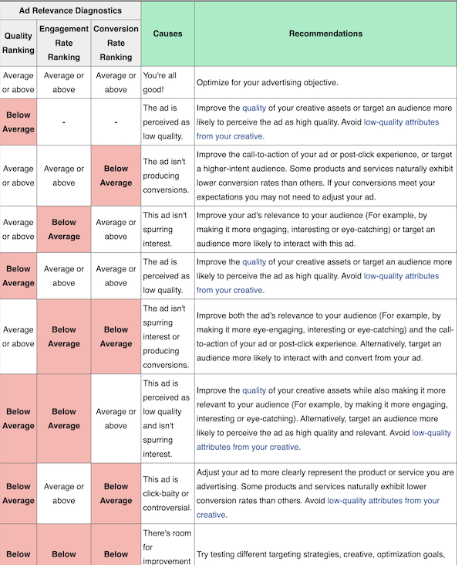
Meta’s core business model relies on delivering a seamless user experience, which is heavily dependent on showing relevant advertisements. The platform continuously evaluates user feedback through ad relevance diagnostics, assessing quality ranking, engagement rate ranking, and conversion rate ranking against competing ads targeting the same audience. If an ad receives consistently low engagement or negative feedback, the system systematically reduces its delivery frequency in favor of higher-performing creative assets.
Resolution Strategies:
When diagnostic scores indicate low relevance, advertisers must pivot their creative strategy. Industry best practices suggest refreshing visual assets, rewriting ad copy to better resonate with consumer pain points, and ensuring that post-click landing page experiences match user expectations. Platform data indicates that moving a ranking metric from "low" to "average" yields a much more significant recovery in delivery than striving to push an already average ad into top-tier status.
9. Scheduling Conflicts and Temporal Errors
Campaign scheduling errors represent some of the most easily overlooked yet common causes of delivery failure. Advertisers frequently input incorrect calendar years, miscalculate timezone conversions across international markets, or fail to account for past campaign end dates. Furthermore, if a campaign has been manually paused and subsequently forgotten, the delivery column will remain stagnant indefinitely.
Resolution Strategies:
Resolving scheduling issues requires auditing the campaign and ad set configuration panels. Marketers must verify that active start and end dates reflect current operational timelines, ensure that campaign toggles are explicitly set to the "Active" position, and confirm that dayparting schedules (if utilized) align with the intended broadcasting windows.
10. Misaligned Optimization Goals and Conversion Starvation
The optimization goal selected during ad set creation instructs the Meta algorithm on the specific consumer action it should prioritize—such as link clicks, landing page views, add-to-carts, or final purchases. While optimizing for bottom-funnel actions like direct purchases is standard practice, selecting high-intent conversion goals for accounts with limited historical data or low incoming traffic can starve the campaign of necessary optimization signals. If conversions do not occur regularly, the algorithm cannot identify patterns among responsive users, ultimately halting delivery entirely.
Resolution Strategies:
To jump-start delivery for accounts struggling with conversion scarcity, digital marketing experts recommend temporarily shifting optimization goals higher up the marketing funnel—such as switching from "Purchases" to "Add to Cart" or "Link Clicks." This provides the algorithm with a higher volume of positive user signals, allowing it to successfully map audience behavior. Once the campaign has stabilized and generated a consistent stream of conversion data, advertisers can safely transition the optimization goal back to bottom-funnel purchase events.