Elevating Sales Performance: How Workflow Automation Drives Revenue Growth and Customer Retention in a Demanding Market

Customer expectations are currently at an unprecedented high, with today’s discerning buyers demanding instant responses, deeply personalized conversations, and frictionless experiences across every touchpoint. Organizations that successfully meet these evolving criteria are reporting significant competitive advantages, including a 41% faster rate of revenue growth and a 51% higher customer retention rate, according to recent industry analyses. This paradigm shift underscores a critical juncture for sales teams globally, moving them away from traditional, labor-intensive processes toward more agile, technology-driven methodologies.
The Evolving Sales Landscape: A Background Context
The digital age has fundamentally reshaped consumer behavior and business-to-business interactions. With readily available information and a multitude of choices, buyers are more empowered than ever. They expect brands to understand their specific needs, communicate proactively, and provide seamless service, mirroring the instant gratification often found in personal digital experiences. However, many sales representatives remain entangled in a "whirlwind" of repetitive, manual administrative tasks. These include mundane activities such as data entry, sending generic email follow-ups, and navigating internal coordination challenges across disparate, disconnected systems. This administrative burden directly impedes their ability to deliver the swift, relevant, and personalized responses that modern buyers expect and demand.
The consequence of this disconnect is twofold: sales professionals are diverted from high-value relationship-building activities, and potential customers experience delays and inconsistencies that erode trust and interest. Research indicates that approximately 45% of sales professionals feel overwhelmed by the sheer number of tools in their technology stack, further highlighting the inefficiency and complexity prevalent in many sales environments. Sales workflow automation tools emerge as a strategic bridge in this scenario, empowering representatives to redirect their focus toward fostering meaningful customer relationships and skillfully advancing deals through the pipeline. This guide will delve into the intricacies of sales workflow automation, explore its practical use cases for significantly reducing "busywork," and identify dependable tools capable of transforming sales operations.
Demystifying Sales Workflow Automation
At its core, sales workflow automation leverages technology to streamline and automatically execute repetitive sales tasks based on predefined triggers and conditions. This sophisticated software eliminates the need for manual intervention in routine operations such such as logging activities, dispatching follow-up emails, and updating contact records within a Customer Relationship Management (CRM) system. The overarching goal is to enhance speed, ensure consistency in outreach, and improve data accuracy throughout the entire sales process.
When meticulously implemented, sales workflow automation enables sales teams to respond more rapidly to inquiries, drastically reduce manual labor, and maintain a consistent follow-up cadence without sacrificing the crucial personal touch that prospects increasingly expect. It transforms the sales process from a series of disjointed, manual efforts into a cohesive, efficient, and strategically managed system.
Strategic Applications: Core Use Cases in Sales Automation

Revenue generation teams can automate various facets of their sales process to achieve substantial improvements in efficiency and conversion rates. Initiating with simple yet highly effective automation initiatives, such as automating lead assignment, email sequences, deal stage progression, and reporting, can yield immediate positive impacts and establish a robust foundation for more sophisticated automation endeavors.
-
Intelligent Lead Assignment and Routing:
The manual distribution of incoming leads is often fraught with delays and inconsistencies. Automating lead assignment and routing ensures that new leads are instantly directed to the most appropriate team member. This assignment can be based on a range of criteria including geographical territory, product expertise, company size, industry vertical, or other custom-defined parameters. The benefits are multifaceted: quicker initial response times, a demonstrable improvement in conversion rates, and increased satisfaction among both sales representatives and prospects due to efficient handling.Platforms like HubSpot’s Sales Hub offer robust workflow automation capabilities that facilitate highly efficient lead assignment and routing. Teams can construct intricate workflows that evaluate lead characteristics upon their entry into the system, subsequently routing them based on predefined rules. These rules can encompass round-robin assignment (distributing leads equally among team members), territory-based routing, or specialized logic tailored for high-value accounts. Furthermore, advanced platforms incorporate overflow routing, which intelligently reassigns leads when primary representatives reach their capacity or are unavailable. This critical feature guarantees that no lead languishes in a queue, ensuring consistent engagement regardless of team availability fluctuations.
-
Automated and Personalized Email Sequences:
Consistency in follow-up is a direct determinant of deal conversion rates. Statistical evidence indicates that approximately 80% of successful sales necessitate five or more follow-up interactions. Relying solely on manual outreach rarely achieves the sustained cadence required for optimal results. Automated email sequences address this challenge by meticulously maintaining the necessary follow-up frequency. They automatically deliver personalized messages at predetermined intervals, dynamically adjusting based on a prospect’s behavior and engagement with previous communications. The outcome is timely, relevant outreach that preserves the essential human touch points without compromise.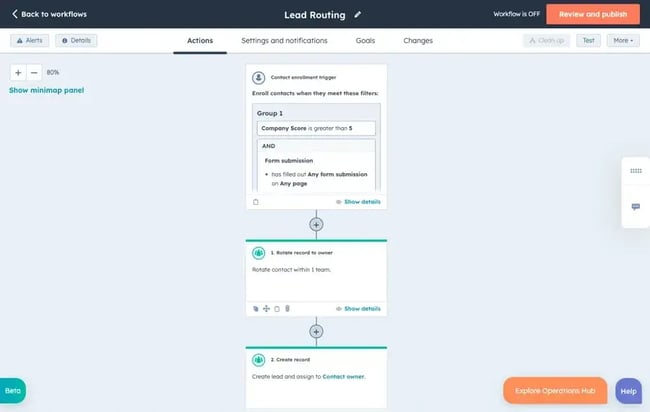
Sales Hub, for example, empowers teams to design multi-touch campaigns that adapt to recipient actions. These sequences can include initial outreach, the delivery of relevant educational content, addressing common objections, and requesting meetings. All these actions are automatically triggered based on time delays or specific prospect engagement signals. Users can select from a library of existing email templates, customize them, or create entirely new ones. The platform’s personalization tokens facilitate the seamless insertion of contact-specific information—such as name, company, and industry—into each message, ensuring communications feel tailored rather than generic. "Smart send" features prevent emails from being dispatched at inconvenient times, while A/B testing capabilities allow teams to identify the most effective messaging and timing strategies. Crucially, when prospects interact with sequence emails (e.g., opening, clicking, or replying), the workflow intelligently adapts. Sales representatives receive immediate notifications regarding high-intent actions, enabling timely and personalized human outreach precisely when prospects demonstrate heightened interest. A notable 73% of sales professionals report an increased win rate as a direct result of utilizing HubSpot.
-
Streamlining Deal Stage Progression:
As sales opportunities advance through the pipeline, ensuring that specific, predefined actions occur at each stage is paramount to maintaining crucial momentum. Deal-stage automation systematically executes sequential tasks as deals transition between pipeline stages, acting as a safeguard against critical steps being overlooked. For instance, this feature can automatically notify a sales manager when a prospect takes a particular action, or alert customer success teams immediately after a deal is officially closed. This capability not only eliminates significant manual administrative work but also provides invaluable "guardrails" for new team members, guiding them through proper procedures and ensuring consistent adherence to best practices.Sales Hub’s pipeline automation functionalities enable teams to trigger a wide array of actions, including follow-up tasks, notifications to relevant stakeholders, automatic updates to deal properties, internal alerts, and complex approval workflows, all in response to deals reaching specific milestones.
-
Empowering Data-Driven Decisions with Automated Reporting:
Sales managers are tasked with keeping their teams informed and leadership aligned, often without the luxury of spending countless hours manually compiling updates. Many sales managers dedicate an hour or more daily to manually gathering data, generating reports, capturing screenshots, and attaching them to emails for distribution. Automated reporting solutions drastically simplify this process, ensuring that everyone remains informed and aligned without requiring additional headcount or excessive manual effort.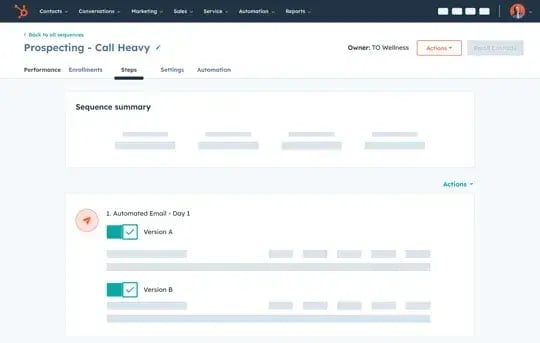
HubSpot’s Smart CRM provides a centralized repository for data from diverse sources, making it effortless to access comprehensive information. This facilitates the automation of report generation and their subsequent distribution via email. For example, a system can be configured to send a daily stack ranking report to the entire sales team or a weekly revenue report directly to the director of sales. This feature significantly reduces the manual burden of reporting while ensuring that updates are consistent, timely, and data-driven.
A Phased Approach to Sales Workflow Automation Implementation
Implementing sales workflow automation effectively necessitates meticulous strategic planning and the careful selection of appropriate tools. However, the process is incomplete without dedicated training, continuous monitoring, and iterative refinement to ensure sustained positive outcomes. The following step-by-step roadmap provides a structured guide for organizations embarking on their sales workflow automation journey.
-
Step 1: Comprehensive Process Audit and Gap Analysis
The initial and most critical step is to conduct a thorough audit of existing sales workflows. This forensic examination aims to uncover specific areas where automation can deliver the most substantial impact. This involves mapping current processes from lead generation to post-sale activities, identifying bottlenecks, redundancies, and any points of friction that consume excessive time or lead to errors. It’s crucial to document the current "as-is" state before designing the "to-be" automated state.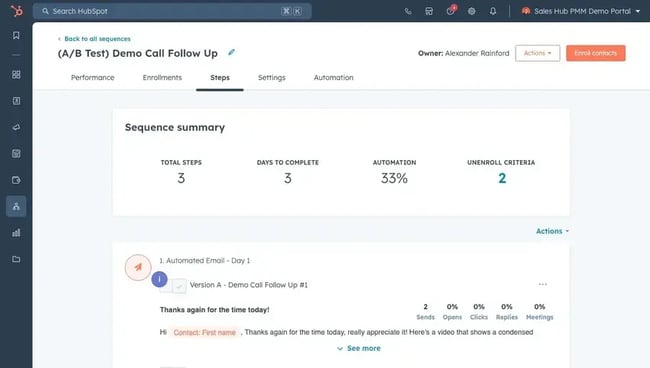
A key component of this audit involves reviewing the existing technology stack. Cataloging all sales tools in use and noting systems that are either redundant, difficult to integrate, or failing to communicate effectively is essential. Integration gaps are often prime targets for automation, as they typically necessitate manual data transfer between platforms, a significant source of "busywork" and potential errors.
-
Step 2: Defining Clear Goals and Measurable Success Metrics
With a clear understanding of areas ripe for improvement, the next step involves establishing unambiguous objectives that will guide the sales workflow automation strategy and enable objective measurement of its success. This ensures a clear direction and provides a framework for evaluating progress. Goals should be SMART (Specific, Measurable, Achievable, Relevant, Time-bound). Examples might include reducing average lead response time by 50% within six months, increasing email sequence reply rates by 15%, or decreasing the time spent on manual reporting by 75%.While monitoring operational metrics such as the number of automated emails sent offers valuable insight into activity, the ultimate goal of sales workflow automation is to achieve tangible business outcomes. These include, but are not limited to, an increase in meeting bookings, a reduction in the average sales cycle duration, higher conversion rates across various pipeline stages, or an increase in revenue generated per sales representative.
-
Step 3: Building and Rigorously Testing Initial Workflows
Once goals are defined, it’s time to begin constructing high-impact workflows within the chosen sales workflow automation software. The recommended approach is to start simply, implement basic automations, and then scale those that prove effective.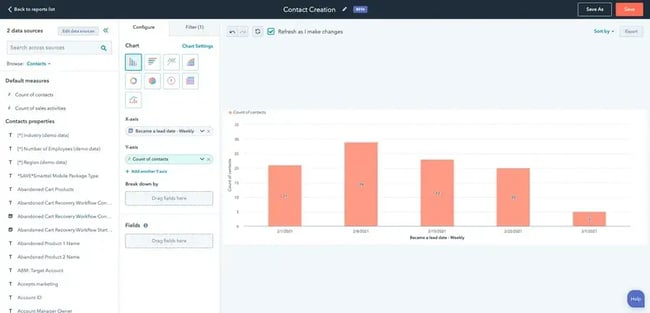
Consider an example: building a foundational lead-nurturing workflow triggered when a contact downloads a specific piece of content. This workflow could be configured with a two-day waiting period, after which the system automatically dispatches a follow-up email containing related resources. Three days later, a task could be automatically generated for a sales representative to initiate personal contact if the prospect has not yet responded.
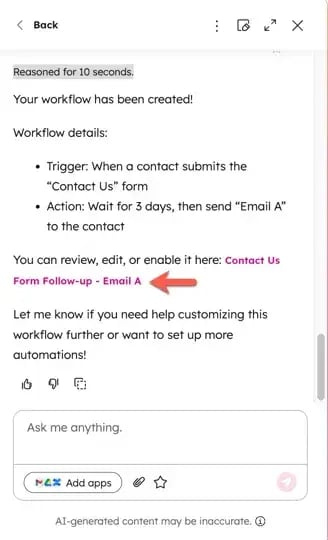
Modern tools, such as HubSpot’s visual workflow builder, simplify this process with intuitive if-then logic and drag-and-drop functionality. Users can navigate to the automation section of their account, set enrollment triggers, and define a sequence of actions. Workflows can typically be created from scratch, leveraging AI to generate workflows based on natural language prompts, or by customizing pre-built templates for common scenarios.
Pro Tip: Before deploying automated sales workflows across the entire team, it is imperative to conduct thorough testing with small, controlled groups. Gathering feedback on effectiveness during this phase helps identify any errors, unexpected behaviors, or potential issues that could negatively impact prospect relationships or create operational problems upon broader rollout.
-
Step 4: Empowering Teams Through Training and Adoption
Even the most sophisticated sales workflow automation software will only deliver its full potential if the sales team understands how to utilize it proficiently. Therefore, once automated workflows are in place and tested, comprehensive training is indispensable. This training must cover both the technical operations of the software and the strategic application of the automation tools. For instance, team members should not only learn how to enroll contacts in sequences but also when to use different sequence templates, or how to interpret automation notifications to inform their personal outreach. Fostering a culture of adoption and demonstrating the value proposition for individual reps is key. Once teams are confident and proficient with the initial automations, the scope can be gradually expanded to include additional use cases.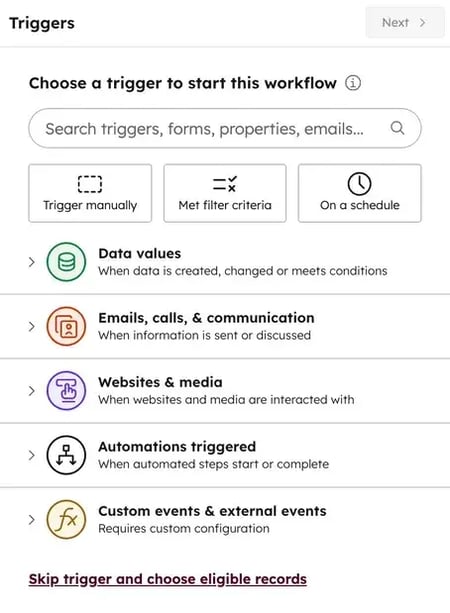
-
Step 5: Continuous Monitoring, Analysis, and Optimization
Automation, while powerful, is not a set-it-and-forget-it solution. Workflows that perform optimally initially can diminish in effectiveness over time due to shifts in external factors such as market conditions, competitive landscapes, or evolving prospect behavior. Consequently, prioritizing ongoing review and refinement is crucial for maintaining the sustained effectiveness of automated workflows.This involves regularly reviewing key performance indicators (KPIs) associated with each workflow, such as open rates, click-through rates, reply rates, meeting booked rates, and conversion rates. Conducting comprehensive audits quarterly allows for a deeper dive into overall strategy and alignment with business objectives. Gathering feedback from the sales team regarding the practical impact and usability of the automations is also vital, as their frontline experience can reveal valuable insights for improvement.
Leading Solutions in Sales Workflow Automation with Integrated CRM
The selection of the appropriate sales workflow automation software is a pivotal decision that significantly influences an organization’s success and long-term value. The following CRM platforms represent leading choices, brilliantly combining robust sales workflow automation capabilities with integrated CRM functionalities. These platforms empower sales teams to eliminate manual, repetitive tasks, mitigate the inefficiencies of switching between disconnected tools, and scale their operations efficiently.
-
HubSpot Sales Hub
HubSpot Sales Hub stands as a premier choice for organizations seeking comprehensive sales automation seamlessly integrated with a powerful CRM. It consolidates contact management, deal tracking, email engagement, meeting scheduling, and workflow automation into a unified system specifically engineered for modern revenue teams. Sales Hub offers a wide spectrum of sales workflow automation applications, from straightforward tasks to highly advanced sequences.At its core, HubSpot’s Smart CRM automatically constructs a comprehensive activity timeline for each contact, providing a rich data foundation for sophisticated automation workflows. Its workflow automation capabilities support complex, multi-step sequences that can combine automated emails, task creation, internal notifications, property updates, and CRM record management. The intuitive visual workflow builder facilitates easy definition of automation logic using if-then branches, time delays, and triggers based on contact properties, behavioral data, or lifecycle stages. Furthermore, Sales Hub delivers robust reporting and analytics, directly correlating automation activities with measurable business outcomes. Custom reports track sequence performance, workflow conversion rates, task completion metrics, and revenue impact, enabling organizations to demonstrate ROI and identify critical optimization opportunities.
- Core automation features: Lead routing, email sequences, task automation, deal stage automation, contact property updates, internal notifications, custom logic.
- Free Trial: Yes.
- Pricing: Free plan (basic CRM/limited automation); Starter ($20/seat/month); Professional (full workflow automation, from $100/month/seat); Enterprise (advanced features/permissions, from $150/month/seat).
- What we like: Unifies marketing, sales, and service automation, eliminating friction across multi-tool stacks. Intuitive interface, even for non-technical users.
- G2 Rating: 4.2/5
- Best for: Revenue teams of all sizes, from startups to enterprises, seeking an all-in-one CRM solution.
-
Salesforce Sales Cloud
Salesforce Sales Cloud provides enterprise-grade sales workflow automation, characterized by extensive customization options and a vast ecosystem of third-party integrations. Its automation features are particularly well-suited for managing complex business processes across large organizations with multiple divisions and diverse sales motions.- Core automation features: Workflow rules, Process Builder, Flow Builder (for complex automations), Approval Processes, Einstein AI-powered insights.
- Free Trial: Yes.
- Pricing: Starts at $25/user/month (basic automation); Professional ($100/user/month); Enterprise ($175/user/month); Unlimited ($350/user/month).
- What we like: Exceptional flexibility for unique business requirements and extensive customization. However, users often note that customization can be complex and requires specialized expertise.
- G2 Rating: 4.4/5
- Best for: Large enterprises with complex sales processes and significant customization needs.
-
Pipedrive
Pipedrive offers straightforward sales automation tailored for small to mid-sized sales teams that prioritize simplicity and ease of use over an extensive feature set. The platform primarily focuses on visual pipeline management and activity-based selling methodologies.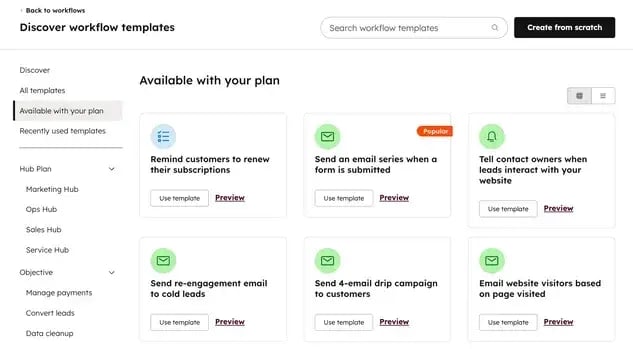
- Core automation features: Workflow automation (limited by plan), email automation, task scheduling, deal progression triggers.
- Free Trial: Yes.
Pricing: Lite plan ($14/user/month, no automations); Growth plan ($24/user/month, 50 automations); Premium plan ($49/user/month, 150 automations); Ultimate Plan ($69/user/month, 250 automations). - What we like: Accessible pricing and an approachable setup for smaller teams. Features are focused, reducing complexity for beginners. Some user reviews indicate features can be somewhat limited compared to more comprehensive platforms.
- G2 Rating: 4.2/5
- Best for: Small sales teams seeking an intuitive platform with minimal setup requirements.
Best Practices for Maximizing Automation Impact and Avoiding Pitfalls
While sales workflow automation offers immense benefits, strategic application is crucial to avoid common pitfalls that can diminish its effectiveness.
-
Optimal Sequence Length and Follow-up Timing: There is no universally fixed number of ideal steps for an automated sales sequence; it largely depends on factors such as deal complexity, average sales cycle duration, and industry norms. The best practice involves iterative testing and monitoring outcomes like reply rates, meeting bookings, and conversion metrics to identify the most effective approach. Simple transactional sales often benefit from shorter, faster-paced sequences, while complex enterprise deals typically require longer sequences that gradually deliver educational content and build relationships. A common starting point for many teams is five to eight touchpoints spread over two to three weeks, balancing engagement with avoiding overwhelming prospects. Similarly, the best timing for automated follow-up emails varies significantly. B2B sales cycles often benefit from business-day scheduling that avoids weekends and evenings, while different industries or time zones may necessitate unique considerations. A/B testing different timing approaches and analyzing sequence analytics is vital to identify optimal patterns within specific markets.
-
Combating Over-Automation with Enhanced Personalization: Over-automation occurs when emails feel impersonal, sequences become overly aggressive, or communications lack relevance to the prospect’s specific needs, leading to diminished reply rates. Preventing this requires moving beyond basic merge fields. Implementing advanced personalization includes dynamically adjusting content based on a prospect’s industry, company size, or recent website activity; segmenting audiences to ensure highly targeted messaging; and integrating human-led touchpoints at critical junctures within automated sequences. Providing clear opt-out mechanisms and honoring prospects’ communication frequency preferences are also essential for maintaining trust.
-
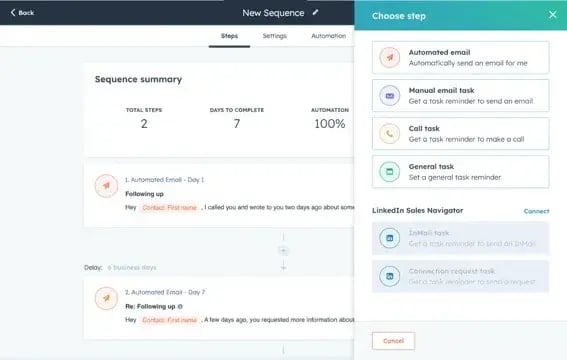
Strategic Use of Tasks vs. Automated Emails: Tasks are best utilized in situations that demand human judgment, complex explanations, or real-time conversation. They are more suitable than automated emails for critical moments such as handling objections, negotiating terms, or presenting proposals, where a sales representative’s personal engagement is indispensable. Automated emails, conversely, are most effective when the primary goal is to maintain consistent touchpoints, deliver information, or nurture leads through less complex stages.
-
Establishing a Regular Audit Cadence: To ensure maximum and sustained impact, automated workflows should be reviewed regularly. A practical approach is to review workflow performance monthly, focusing on key metrics, and conduct comprehensive audits quarterly. These audits should involve evaluating workflow logic, updating content (emails, tasks), refining segmentation criteria, and integrating team feedback. This continuous optimization cycle is vital for adapting to market changes and maintaining peak efficiency.
Conclusion: The Future of Sales is Automated and Customer-Centric
Sales workflow automation is no longer a luxury but a strategic imperative for modern businesses. By systematically eliminating manual "busywork" for sales teams, it ensures consistent execution across all stages of the sales cycle, thereby freeing up valuable time for representatives to focus on high-value activities: relationship-building, strategic selling, and problem-solving. Organizations that thoughtfully implement sales workflow automation strategies consistently report faster response times, improved conversion rates, and more scalable growth trajectories.
The cornerstone of automation success lies in a strategic initiation—targeting high-impact workflows first—coupled with the utilization of a dependable sales workflow automation tool. Crucially, it involves maintaining the indispensable human element that fosters authentic relationships. While initial implementation sets the foundation, continuous optimization based on performance data and invaluable team feedback is absolutely necessary to ensure sustained success and adaptability in an ever-changing market.
HubSpot Sales Hub exemplifies the comprehensive capabilities required, offering robust sales workflow automation alongside an integrated CRM infrastructure. This empowers modern sales organizations to thrive by providing intelligent lead assignment, sophisticated email sequences, and precise deal stage automation. Its unified system efficiently supports the entire sales process, enabling businesses to meet rising customer expectations and secure a competitive edge in today’s demanding sales environment.
Related posts: