
Digital marketing professionals and business owners investing in paid social media campaigns frequently encounter a frustrating operational hurdle: logging into Meta Ads Manager only to discover that active advertisements have completely stopped delivering. When an ad campaign fails to generate impressions or reach the designated target audience, it halts lead generation, stalls revenue streams, and wastes valuable marketing budgets. Understanding why this phenomenon occurs requires a deep dive into the complex mechanics of ad delivery systems, automated moderation protocols, algorithmic optimization, and auction dynamics.
The Mechanics of Ad Delivery and the "Not Delivering" Status
In the ecosystem of digital advertising, when an ad is labeled as "not delivering," it signifies that an active campaign is failing to serve advertisements to the specified target demographic. Consequently, the campaign accrues zero impressions. This technical roadblock can impact newly launched creatives or established ad sets that have historically performed well.

To diagnose this issue, media buyers must navigate to the Meta Ads Manager dashboard and inspect the "Delivery" column. If an underlying technical impediment obstructs the distribution of the creative, the system typically displays a specific sub-status, such as "Update required." Fortunately, the vast majority of delivery stoppages stem from identifiable configuration errors or policy violations that can be swiftly resolved through targeted administrative adjustments.
1. The Associated Social Media Post Is Unavailable
A frequent catalyst for delivery failure involves the underlying post tied to the advertisement. If a page administrator deletes the original organic post, modifies its privacy settings to restrict visibility, or removes the administrative permissions required to promote the content, the advertisement loses its anchor.
To rectify this issue, marketers must navigate to Ads Manager, identify the affected campaign, and select an alternative available post or adjust the access permissions of the original asset. Once the necessary corrections are executed, toggling the ad set back to active will clear the "Update required" sub-status, allowing the system to resume standard distribution.
2. Ongoing Review Processes and Editorial Timelines
Every advertisement submitted to the Meta platform undergoes a rigorous evaluation procedure before going live. This dual-layer system relies on automated machine learning algorithms to scan text, imagery, and landing pages, supplemented by manual reviews conducted by human support staff when flagged for potential policy infractions.
According to official platform documentation, the vast majority of advertisements complete the review phase within 24 hours. However, peak retail seasons, global holidays, and periods of high volume frequently extend review windows significantly. Industry analysts advise brands to schedule campaigns days in advance to accommodate these administrative delays.
Furthermore, marketers must exercise caution regarding post-approval edits. Altering key elements of a live or scheduled ad—such as the creative assets, primary text, call-to-action buttons, or landing page URLs—automatically triggers a fresh review cycle. Best practices dictate that campaigns should remain entirely unedited until the initial review phase successfully concludes.
3. Policy Rejections and Compliance Infractions
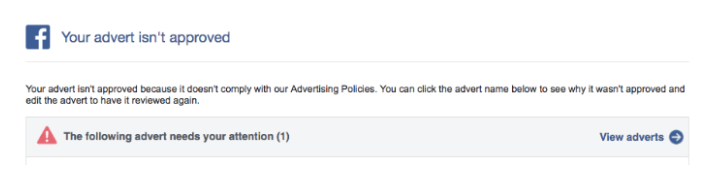
When an advertisement violates established advertising standards, platform moderators reject the creative entirely, halting all distribution. Rejections typically trigger an automated notification email detailing the rationale behind the decision, which can be cross-verified within the Ads Manager interface under the campaign’s status indicators.
Common grounds for rejection include prohibited content categories, misleading claims, excessive use of profanity, sensationalized phrasing, or non-functional landing pages. Resolving a rejection requires editing the offending creative to comply with terms of service or submitting a formal appeal through the Account Quality dashboard if the rejection is believed to be erroneous. Additionally, advertisers promoting sensitive verticals—such as employment, housing, or social issues—must correctly categorize their campaigns to avoid unnecessary targeting restrictions or total delivery blockades.
4. Account Spending Limits and Financial Thresholds
Financial governance controls within Ads Manager occasionally halt ad delivery unexpectedly. Account spending limits establish a strict cumulative budget ceiling across all campaigns housed within a specific ad account. Once this financial threshold is reached, the platform automatically halts all ad delivery regardless of individual campaign budgets.

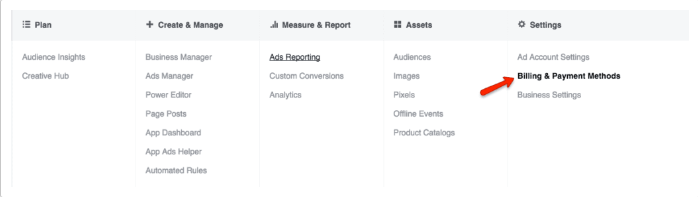
Media buyers can resolve this barrier by navigating to the Billing and Payment Methods section within Ads Manager settings. Reviewing the account spending limit box reveals the exact utilization rate. By increasing, resetting, or completely removing the cap, marketers can immediately restore normal delivery across all active campaigns.
5. Insufficient Budgets and Restrictive Bidding Caps
The ad delivery algorithm relies on financial parameters to determine how frequently and widely an advertisement should be served. When daily budgets are set too low—such as allocating a nominal three dollars per day—the algorithm lacks the financial leverage required to test the creative effectively, leading to complete delivery suppression.
Similarly, deploying a generous daily budget while enforcing an artificially tight bid cap restricts the algorithm’s ability to win auctions in competitive marketplaces. Industry experts recommend utilizing lifetime budgets to allow the system flexibility over the campaign’s lifespan, combined with lowest-cost automatic bidding strategies during the initial optimization phase to establish baseline performance metrics before introducing manual constraints.
6. Overly Narrow Audience Parameters
Precision targeting represents a cornerstone of effective digital marketing, but excessive restriction can inadvertently break ad delivery. Meta’s distribution framework typically requires a minimum audience size of approximately 1,000 users to gather statistically significant performance data.
When targeting parameters or custom customer lists fall below this functional threshold, the algorithm cannot evaluate user behavior effectively. Marketers can resolve this constraint by broadening geographic radii, expanding age brackets, incorporating lookalike audiences, or enabling Advantage+ audience expansion features to increase the total addressable pool of potential viewers.
7. High Auction Overlap and Internal Competition
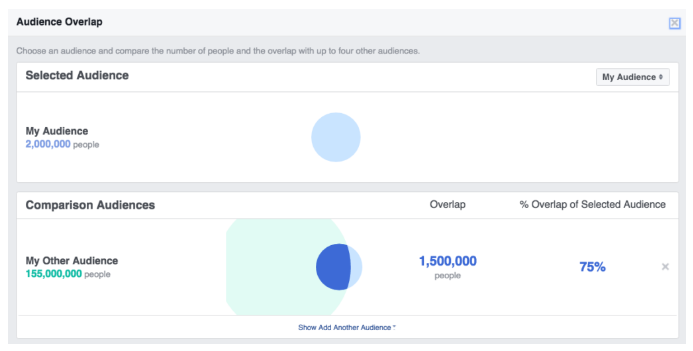
When multiple ad sets from the same advertiser target overlapping demographic segments, the campaigns inadvertently compete against one another in the real-time ad auction. To prevent internal cannibalization, the platform’s auction system automatically prioritizes the ad set with the highest total value while pausing or suppressing underperforming counterparts.
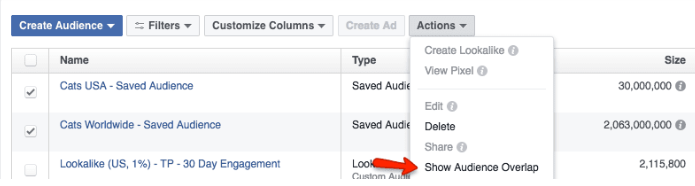
To diagnose this issue, marketers utilize the Audience Overlap tool located within the Audiences tab of Ads Manager. Analyzing the overlap percentage allows professionals to restructure their account architecture by merging competing ad sets, redefining target parameters, or consolidating campaigns to eliminate internal friction and maximize budget efficiency.
8. Suboptimal Ad Relevance and Low Engagement
The platform’s underlying economic and user experience models prioritize high-relevance content. Advertisements that fail to resonate with target users—resulting in low click-through rates, negative feedback, or minimal interaction—are systematically deprioritized in favor of more engaging creatives.
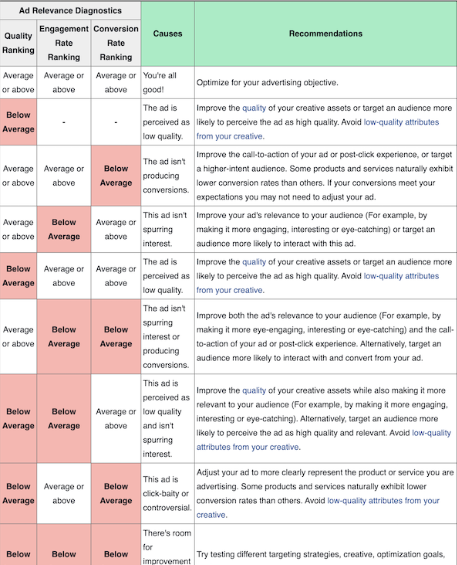
Platform diagnostic metrics evaluate quality ranking, engagement rate ranking, and conversion rate ranking. Industry data indicates that elevating a low ranking to an average benchmark yields significantly better delivery improvements than pushing an average ranking to above-average status. Marketers facing low relevance scores must refresh their visual assets, refine copywriting, optimize post-click landing page experiences, and retarget higher-intent user segments.
9. Scheduling Conflicts and Temporal Restrictions
Temporal configuration errors frequently account for unserved advertisements. If a campaign’s specified end date has passed, or if ad sets remain in a manually paused state, the delivery system will naturally withhold impressions. Furthermore, discrepancies involving time zone configurations between the business manager and target markets can delay activation.
Conducting a routine audit of campaign schedules, start dates, and dayparting parameters ensures that active promotions align precisely with intended operational windows. Resetting expired timelines or manually restarting paused campaigns immediately reinstates delivery status.
10. Misaligned Optimization Goals and Conversion Tracking
Optimization goals instruct the ad delivery algorithm on the exact user action the campaign aims to drive, such as link clicks, lead form submissions, or direct purchases. Selecting an optimization goal that requires high-friction user behavior—such as a direct purchase conversion—can backfire if the initial creative lacks sufficient historical data to convince the algorithm of buyer intent.
When conversion data remains scarce, the system halts delivery because it cannot identify interested users. Media buyers can overcome this hurdle by temporarily shifting optimization goals toward higher-frequency actions, such as link clicks or adding items to a cart, allowing the algorithm to accumulate behavioral signals. Once stable conversion volumes are established, campaigns can safely revert to purchase or lead optimization goals.
Broader Industry Implications and Best Practices
The increasing reliance on automated machine learning within digital advertising platforms underscores the necessity for proactive campaign management. As algorithms grow more autonomous, marketers must shift their focus from micromanaging individual targeting parameters to providing robust creative inputs, healthy financial parameters, and clear optimization signals.
Industry analysts emphasize that maintaining high delivery rates requires continuous monitoring of account health, strict adherence to platform policies, and regular audits of audience overlap and relevance diagnostics. By systematically addressing these ten common bottlenecks, marketing professionals can safeguard their ad investments, maximize return on ad spend, and maintain consistent, uninterrupted campaign performance in an increasingly competitive digital marketplace.
Related posts: