
Digital marketing professionals and business owners frequently encounter a frustrating scenario: logging into the Meta Ads Manager only to discover that active ad campaigns are failing to deliver impressions, reach target audiences, or generate leads. When the "Delivery" column displays a "Not delivering" or "Update required" status, it halts marketing momentum and wastes valuable advertising capital. Understanding why these delivery bottlenecks occur is critical for maintaining campaign performance and maximizing return on ad spend (ROAS).
To address this widespread issue, industry analysts and platform documentation point to several core operational friction points. Below is an exhaustive breakdown of the ten most common reasons Facebook ads fail to deliver, accompanied by actionable, step-by-step remedies to get campaigns back on track.

Understanding the Mechanics of Facebook Ad Delivery
Before diagnosing specific errors, it is essential to understand what "not delivering" actually signifies within the Meta advertising ecosystem. When an ad carries this status, it means the campaign is technically active, but the platform’s delivery system is refusing to serve it to the specified target audience. Consequently, the ad generates zero impressions and no engagement.
This issue can affect newly created campaigns awaiting initial push, as well as established ads that have previously run smoothly. Meta’s delivery algorithm relies heavily on a complex auction system, user signals, and historical performance data. When a variable within the campaign parameters violates platform guidelines, restricts the algorithm, or starves the ad of necessary data, the delivery mechanism halts automatically.
1. The Underlying Post or Asset Is Unavailable
One of the most frequent technical triggers for ad delivery failure is the unavailability of the organic post or creative asset linked to the advertisement. If an advertiser promotes an existing post from a Facebook Page or Instagram account, and that post is subsequently deleted, hidden, or restricted by privacy settings, the ad loses its anchor. Similarly, broken links, deleted images, or altered permissions on business assets will trigger an "Update required" sub-status in the Ads Manager dashboard.
The Remediation Strategy:
To resolve asset availability issues, advertisers must inspect the linked post or creative asset directly. If the original post has been removed or modified, the best course of action is to select an alternative post or restore the necessary permissions within Meta Business Suite. Once the underlying asset is secured and accessible, advertisers should toggle the affected ad set back to active. If successful, the error warning will immediately disappear from the dashboard.
2. The Ad Is Trapped in the Review Queue
Meta enforces a rigorous compliance policy, requiring automated systems and human moderators to review every advertisement before it goes live. This review process evaluates ad creative, text, targeting parameters, and associated landing pages to ensure adherence to community standards and advertising terms of service. According to Meta’s official business guidelines, standard reviews are typically completed within 24 hours. However, during high-traffic periods—such as major retail holidays, Black Friday, or election cycles—review queues frequently experience severe backlogs, causing approvals to take significantly longer.
The Remediation Strategy:
Proactive planning is the most effective defense against review delays. Media buyers should schedule campaigns several days in advance of their intended launch dates to accommodate potential manual reviews. Furthermore, marketers must avoid editing campaigns while they are pending review. Altering the creative, budget, or targeting of an ad that is already under review resets the compliance clock, forcing the algorithm to initiate a brand-new review cycle from scratch.
3. Campaign Rejection Due to Policy Violations
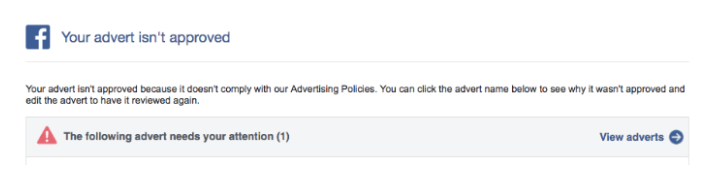
If an advertisement fails to clear the automated or manual review process, it receives a rejection status. When this occurs, Meta ceases all delivery efforts and notifies the advertiser via email, while updating the ad’s status within the Ads Manager interface. Ad rejections are widespread across industries, often triggered by prohibited content, restricted product categories (such as cryptocurrency, adult products, or healthcare), misleading claims, sensationalized language, or the use of profanity. Additionally, Meta’s review extends beyond the ad itself to the destination landing page; if the landing page is broken, misleading, or features content inconsistent with the ad, the entire campaign will be blocked.
The Remediation Strategy:
Advertisers facing ad rejections have two primary paths forward: editing the campaign or filing an appeal. If the rejection stems from a clear policy infraction—such as prohibited terminology—the ad copy or creative must be modified to comply with guidelines before resubmitting. Conversely, if marketers believe the rejection was an automated error, they can submit a formal appeal through the "Account Quality" dashboard in Meta Business Manager. Special care must also be taken to categorize sensitive campaigns correctly, such as ads concerning social issues, elections, or employment, to prevent unnecessary restrictions.
4. Depleted Account Spending Limits
Many organizations establish internal financial safeguards to prevent runaway spending, only to forget these thresholds exist. An account spending limit represents the absolute financial ceiling for all ad campaigns operated within a specific business account. Once cumulative spending reaches this predefined cap, Meta instantly halts the delivery of every active campaign associated with the account, regardless of individual campaign budgets.

The Remediation Strategy:
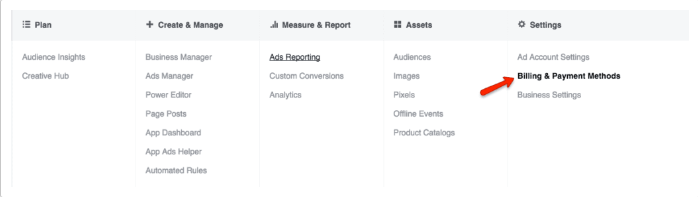
Resolving a spending limit bottleneck requires navigating to the Ads Manager settings. By selecting Settings, proceeding to Billing and Payment Methods, and reviewing the account spending limit box, marketers can easily monitor how much of their allocated budget has been consumed. If the limit has been reached, administrators can increase the threshold, reset the counter entirely, or remove the limit to allow ad delivery to resume immediately.
5. Overly Restrictive Budgets or Rigid Bid Caps
The Facebook ad delivery algorithm requires financial flexibility and sufficient data to optimize performance. When a daily budget is set too low—such as allocating a mere $3 per day—the algorithm cannot secure enough impressions to gather statistically significant performance data. Consequently, the delivery system throttles and eventually halts the ad entirely. Similarly, setting a rigid bid cap that is significantly lower than the market average restricts the ad from winning auctions, starving the campaign of necessary reach.
The Remediation Strategy:
To give the algorithm adequate room to optimize, advertisers should establish realistic daily or lifetime budgets. Utilizing a lifetime budget allows Meta to dynamically distribute funds across the campaign’s lifespan based on audience availability and auction dynamics. Additionally, marketers are advised to launch new campaigns using the "Lowest Cost" automated bidding strategy. This approach secures the best possible results at the most efficient price point, preventing bids from falling out of alignment with real-time market competition.
6. Extremely Narrow Audience Targeting Parameters
Hyper-targeted advertising is often touted as a best practice for reaching ideal customer profiles, but excessive restriction can backfire. Meta’s algorithm requires a minimum operational threshold—typically at least 1,000 active users within a defined target audience—to effectively test, learn, and deliver advertisements. If custom audience lists are too small, or if geo-targeting and demographic filters shrink the potential pool below viable levels, the delivery system will stall.
The Remediation Strategy:
When audience size triggers delivery failure, marketers must systematically expand their parameters. Effective expansion techniques include broadening geographic boundaries, removing overly niche interest categories, increasing age or gender brackets, or leveraging Meta’s "Advantage+ Audience" and lookalike audience scaling features. Expanding the audience pool provides the algorithm with the volume required to sustain continuous ad delivery.
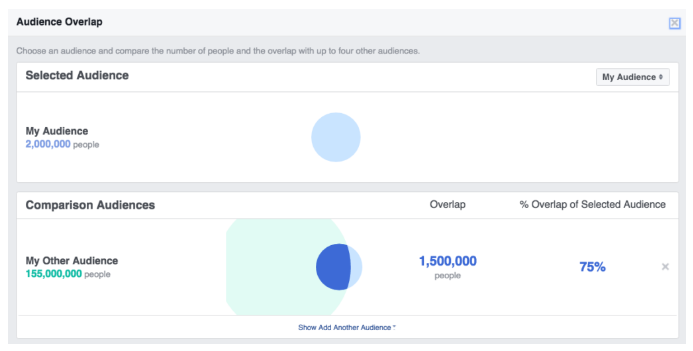
7. High Auction Overlap and Internal Competition
When managing multiple ad sets within the same ad account, advertisers frequently make the mistake of targeting overlapping audience segments. When two or more ad sets target identical or nearly identical groups of users, Meta’s auction system is forced to prevent the advertiser from competing against themselves. During the auction process, the algorithm evaluates competing internal ads, selects the creative with the highest total value to participate, and automatically pauses the lower-value ad sets. While this mechanism protects budgets from self-inflation, it frequently results in suppressed delivery and underperforming campaigns.
The Remediation Strategy:
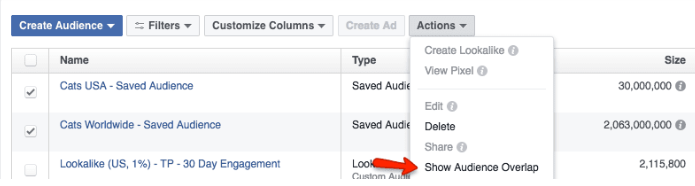
Advertisers can diagnose internal competition by utilizing Meta’s native Audience Overlap tool located within the Audiences tab of Ads Manager. By analyzing overlap charts, marketers can identify which ad sets are cannibalizing each other’s reach. To resolve the issue, advertisers should consolidate overlapping ad sets into a single campaign, merge target audience definitions, or differentiate the targeting criteria so that distinct segments receive unique messaging.
8. Subpar Ad Engagement and Low Relevance Diagnostics
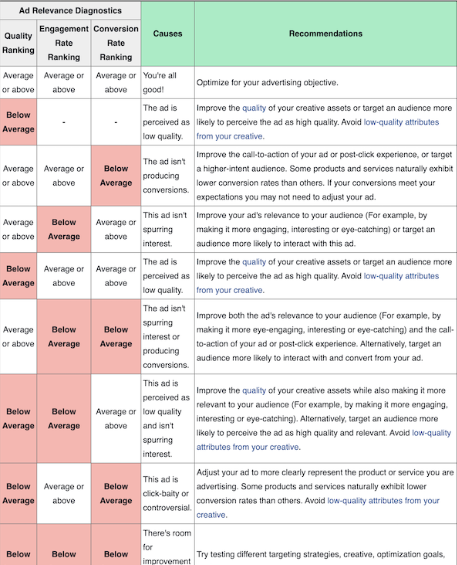
Meta’s core business model relies on delivering a seamless user experience, which includes serving highly relevant, engaging content in user feeds. To maintain platform quality, Meta continuously evaluates advertisements using ad relevance diagnostics, which measure quality ranking, engagement rate ranking, and conversion rate ranking against competing ads targeting the same audience. If an ad consistently generates negative feedback, hidden posts, or minimal user interaction, Meta will deprioritize its delivery in favor of higher-performing content from competing advertisers.
The Remediation Strategy:
Revitalizing low-engagement ads requires a creative overhaul. Marketers should test fresh visual assets, rewrite ad copy to better resonate with audience pain points, and refine post-click landing pages to ensure a cohesive user journey. According to platform data, improving a ranking metric from "low" to "average" yields a much stronger performance lift than pushing from "average" to "above average." Focus should therefore center on correcting fundamental creative disconnects.
9. Scheduling Conflicts and Temporal Restrictions
Ad delivery relies heavily on precise timekeeping. Campaign delivery will abruptly halt if scheduling parameters contain errors, such as an end date that has quietly passed, a start date configured far in the future, or manual ad set pauses that were never reversed. Furthermore, advertisers utilizing ad scheduling (dayparting) may find that ads fail to deliver outside of specific operational hours.
The Remediation Strategy:
Resolving scheduling errors requires a routine audit of campaign parameters within Ads Manager. Marketers should verify that campaign start and end dates align with marketing calendars, ensure that paused campaigns are manually toggled back to active status, and adjust dayparting configurations if temporal restrictions are overly restrictive.
10. Unrealistic Optimization Goals and Conversion Starvation
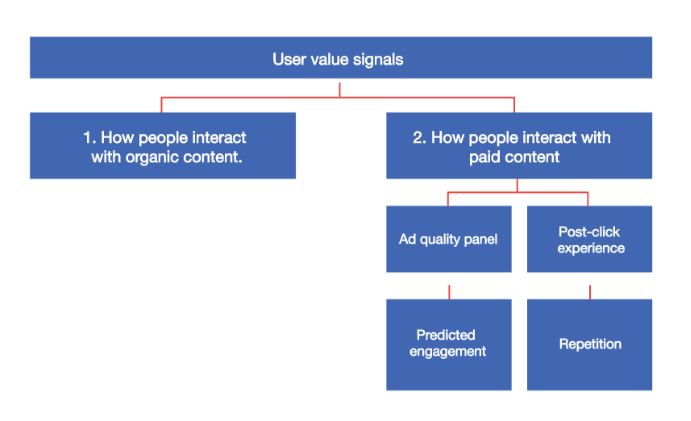
Optimization goals instruct the Meta algorithm on the exact user action a campaign is designed to drive—such as website purchases, lead generation forms, or app installs. The algorithm uses historical user value signals to find individuals most likely to complete the desired action. However, selecting an aggressive optimization goal like "Purchases" for a brand-new pixel or a low-traffic website can backfire. If the campaign fails to generate conversions quickly, the algorithm lacks the data necessary to identify target buyers, causing ad delivery to grind to a halt.
The Remediation Strategy:
To break a conversion starvation cycle, advertisers should temporarily adjust their optimization goals to actions higher up the conversion funnel. For example, switching an e-commerce campaign’s optimization goal from "Purchases" to "Add to Cart" or even "Link Clicks" provides the algorithm with a higher volume of positive interaction data. Once the campaign consistently accumulates engagement and data, marketers can safely switch the optimization goal back to bottom-funnel conversions, ensuring sustained, optimized delivery across all active campaigns.