
The State of CRM Integrations in 2026: Why Unified Platforms Are Replacing Patchwork Software Stacks

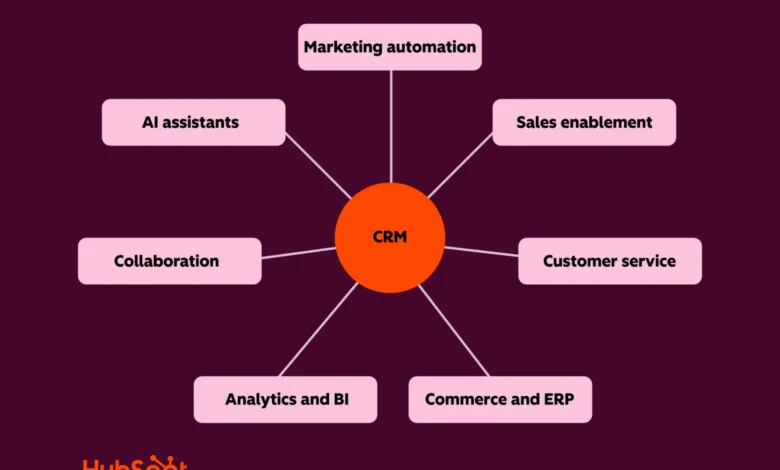
The modern revenue leader is drowning in software. Despite continuous investments in cutting-edge sales technology, recent industry data reveals a distinct shift in executive sentiment: leadership no longer wants another standalone point solution. Instead, the overwhelming priority is to make existing enterprise tools communicate seamlessly. According to HubSpot’s 2026 State of Sales report, a striking 88% of revenue and sales leaders agree that their sales processes would benefit profoundly from a single, integrated platform. Yet, very few organizations achieve this ideal by purchasing a monolithic system straight out of the box. Rather, the vast majority of growing enterprises are forced to construct a cohesive, integrated CRM system out of the disparate software tools they already run daily.
This structural dilemma has placed customer relationship management (CRM) integrations at the very center of corporate technology strategies. CRM software integrations act as the digital connective tissue of modern business operations. They are the underlying pathways that allow a marketing platform to pass a freshly captured lead directly to the CRM, a customer support desk to log a ticket against the exact same contact profile, and a billing utility to dynamically mark a pending deal as paid. The ultimate result of this connectivity is shared institutional context. When integrations function correctly, sales representatives can review the exact marketing campaign that produced a lead before making their first outbound call, while customer support agents can instantly spot open renewal risks before answering a client’s troubleshooting ticket.
Navigating the complex landscape of CRM integrations fundamentally boils down to answering three critical operational questions: Which architectural connection model fits best—native, iPaaS, API, or a two-way sync? Which specific business tools need to be connected first based on immediate ROI? And finally, who maintains each individual connection once it goes live? Addressing these operational questions, alongside the integration of modern artificial intelligence assistants into legacy workflows, represents the primary focus for IT and sales operations teams today.
Defining CRM Software Integrations and the Silo Problem
At its core, a CRM software integration connects a central database with the diverse applications a business utilizes across marketing, sales, service, commerce, finance, and analytics. This technical linkage ensures that a data record created in one distinct system automatically populates and updates across all others. Organizations typically execute these integrations through vendor-built connectors, third-party middleware platforms, custom application programming interface (API) links, or continuous two-way data syncs. Regardless of the technical mechanism employed, the overarching objective remains singular: establish a single, unified customer record that every internal department reads from and writes to simultaneously.
Historically, enterprises have struggled with the pervasive "data silo" problem. In a disconnected technological ecosystem, every individual tool maintains its own isolated version of the customer. The marketing platform tracks which specific email newsletters a contact opened; the customer support desk logs what technical failure occurred; and the corporate billing tool records precisely how much capital the client paid. When these systems fail to share records in real time, every internal team is forced to operate from a fragmented, partial view of the customer relationship. Consequently, the CRM often retains whatever outdated information a human employee last manually typed into it.
A fully connected system completely eliminates these operational gaps. By unifying customer context across marketing, sales, and service workflows, every operational hub reads from the exact same contact, company, and deal records. Across revenue-generating teams, well-executed integrations consistently improve data accuracy, cross-departmental visibility, and overall conversion velocity.
Evaluating CRM Integration Models: Pros, Cons, and Trade-offs
Choosing the right CRM integration model requires a careful evaluation of standard use cases, internal technical maintenance capacity, and data governance requirements. According to HubSpot’s 2026 State of Sales data, approximately 65% of revenue teams spend between two and 10 hours every month simply maintaining their existing integrations—an ongoing operational cost that most organizations completely fail to account for during initial software evaluations. If a poorly chosen integration model takes an afternoon to set up but costs a full day of engineering time per month to maintain, the long-term financial drain can be severe.

Enterprise technology stacks typically rely on four primary integration models, each possessing distinct architectural advantages and operational trade-offs:
-
Native Integrations: These are prebuilt connections developed, hosted, and maintained directly by the CRM vendor or its certified partners. Installed via an app marketplace with minimal configuration, native integrations drastically reduce setup time and ongoing maintenance for common use cases because the vendor handles version changes and API updates on both ends. However, native solutions often lack flexibility. A business that requires custom data objects mapped in a non-standard way will quickly hit a functional ceiling.
-
Integration Platform as a Service (iPaaS): Platforms such as Zapier, Make, Workato, and Boomi connect disparate systems through a hosted middle layer. Users construct automated workflows that watch for a specific trigger event in one application and execute an action in another. iPaaS tools are invaluable when native integrations fall short due to complex conditional logic, multi-step routing, or data transformations. However, they introduce recurring subscription costs and create a secondary layer of logic living entirely outside the CRM. If a connected application renames a database field, the flow can break silently.
-
API Integrations: Custom-coded API integrations directly interface with a CRM’s application programming interface. Written and maintained by internal engineering teams or external agencies, custom APIs offer absolute control over data movement, transformation routines, and execution timing. They remain the only viable option for proprietary systems lacking prebuilt connectors. Nevertheless, API rate limits, authentication updates, and schema modifications all fall squarely on the engineering team that wrote the code, making them costly to maintain over time.
-
Two-Way Sync: Two-way synchronization ensures that records remain actively matched in both connected systems, meaning a modification in either environment immediately updates the other. Rather than a standalone technical method, two-way sync is a behavioral mode that can be implemented via native connectors, iPaaS flows, or custom APIs. Because both systems act as equal sources of truth, this model carries the highest data governance load, as duplicate records, conflicting field updates, and stale data can rapidly compound in both directions.
The Six Essential CRM Integrations Evaluated by Revenue Teams
When organizations audit their technology stacks, six primary categories of CRM software integrations consistently emerge as top priorities. The order in which a company tackles these integrations usually mirrors where internal data gaps are causing the most severe friction:
-
Marketing Automation: These integrations pass leads, form submissions, web tracking data, and campaign memberships directly into the CRM, while pushing CRM performance data back out to refine audience segmentation. CRM website integration is typically the foundational step, ensuring that incoming website visitors are tagged with their original traffic source before a sales representative initiates contact.
-
Sales Enablement: Connecting sales enablement tools—such as e-signature platforms, automated quoting software, and conversation intelligence recorders—brings critical deal-stage data directly into the CRM without requiring manual data entry from reps. Without these automated linkages, pipeline tracking relies entirely on human discipline, which frequently fails.

-
Customer Service: Service integrations link help desks, live chat utilities, knowledge bases, and customer satisfaction surveys to the CRM. For revenue leadership, the primary value of this integration is customer retention. Sales representatives preparing for client renewal conversations must have immediate visibility into open support tickets before speaking with the customer.
-
Commerce and ERP: Enterprise Resource Planning (ERP) and commerce integrations synchronize orders, invoices, payment histories, inventory levels, and account balances between back-office financial systems and the front-office CRM. Because ERPs typically serve as the system of record for billing while the CRM governs the relationship, proper field mapping is vital to prevent invoicing errors.
-
Analytics and Business Intelligence (BI): Analytics integrations extract raw CRM data into data warehouses or advanced BI platforms like Looker, Tableau, or Power BI. By combining CRM pipelines with product usage telemetry and financial metrics, revenue leaders can accurately analyze win rates by acquisition channel or calculate churn pathways.
-
Collaboration Tools: Collaboration integrations push critical CRM events directly into internal communication platforms like Slack or Microsoft Teams, while automatically populating Google or Outlook calendars with booked meetings. These integrations dramatically reduce internal communication friction, ensuring no deal update goes unnoticed.
Controlling CRM Sync and Data Quality
The implementation of a two-way CRM sync demands rigorous data governance to prevent the proliferation of duplicate records, contradictory field updates, and corrupted databases. While a simple one-way data push can often survive without strict oversight, a bidirectional sync cannot; every data error it introduces is automatically copied back to the source system.
To quantify this risk, HubSpot’s 2026 State of Sales report highlights that 43% of revenue teams spend between six and 10 hours every month manually reconciling revenue data. This equates to roughly an entire business day lost per month just figuring out why two critical enterprise systems disagree. Establishing a formal data integration strategy—defining field maps, running rigorous test scenarios, and assigning a named data owner prior to launch—is the only way to convert that administrative overhead back into active selling time.
The Role of Artificial Intelligence in Modern CRM Integrations
Artificial intelligence has rapidly transitioned from a speculative novelty to a core operational layer within the enterprise CRM stack. Modern AI assistants function by safely reading CRM context and executing proposed tasks through existing system permission structures. When an AI agent is granted visibility into a contact’s historical engagement, active pipeline deals, and recent support tickets, it can instantly synthesize insights that would otherwise take human employees hours to compile: identifying stalled deals, summarizing past client calls, or flagging accounts facing both upcoming renewals and unresolved technical complaints.
Industry adoption of these capabilities is accelerating rapidly. According to the 2026 State of Sales report, 94% of sales leaders actively utilize artificial intelligence, with 80% reporting that AI is now "fully integrated" into their CRM environment. However, the same report sounds a note of caution: 31% of leaders acknowledge that integrating AI with existing enterprise systems remains a major implementation challenge. An AI assistant operating without direct, secure access to unified CRM records remains largely ungrounded in actual business reality.

Secure AI deployments must inherit strict user-level permissions, ensuring that individual sales representatives can only query the pipeline data they are authorized to view. Furthermore, responsible AI architecture relies on human-in-the-loop validation; the assistant proposes actions—such as drafting a follow-up task or logging a meeting note—for human approval rather than executing database modifications silently.
Avoiding Common CRM Integration Failures
Despite the clear benefits of a connected technology stack, many integration projects falter due to preventable architectural mistakes. Technology leaders must actively guard against four primary pitfalls:
-
Duplicate Records: Allowing multiple independent tools to create CRM records without a standardized matching rule inevitably leads to fragmented customer histories. Enforcing a universal deduplication key, such as corporate email domains or unique taxpayer IDs, is mandatory.
-
Brittle Logic: Integrations built on overly rigid assumptions will inevitably fail when faced with incomplete or inconsistent real-world data. Logic routines must be designed to gracefully handle missing field values, renamed picklist labels, and unexpected data formats.
-
Unclear Ownership: Assigning an integration without a designated human owner almost guarantees prolonged downtime when errors occur. Every automated data pipeline must have a clearly named operational custodian responsible for monitoring error logs and managing schema updates.
-
Over-Automation Before Data Cleanup: Activating aggressive automated routing rules or AI-driven workflows before auditing and cleaning underlying database records will simply ensure that bad decisions are executed at scale. Comprehensive data hygiene must always precede workflow automation.
Conclusion: Building Resilient Integration Strategies
Ultimately, the long-term success of any enterprise CRM integration strategy relies on structural alignment: matching the appropriate integration model to the specific operational requirement, establishing rigorous data governance frameworks before deployment, and ensuring that automation only runs on verified, clean data. As businesses continue to rationalize their software expenditures and demand greater efficiency from their revenue operations, organizations that successfully unify their technological ecosystems will secure a distinct competitive advantage in an increasingly automated marketplace.