
Introduction to Power Query: Mastering Modern Data Preparation and Transformation in Excel and Power BI


In the modern data-driven economy, organizations across all sectors generate an unprecedented volume of information daily. However, raw data is rarely analysis-ready. Analysts, finance professionals, and business intelligence experts routinely spend countless hours on tedious, manual data preparation—importing messy spreadsheets, removing duplicate entries, fixing inconsistent formatting, and manually stitching together disparate files before any actual analytical work can even begin. To address this persistent productivity bottleneck, Microsoft developed Power Query, a powerful data connectivity and preparation engine embedded within Excel and Power BI. Recognizing the growing industry demand for streamlined data workflows, educational platforms and professional training providers have introduced comprehensive curricula, such as the "Introduction to Power Query" course, designed to help professionals transition from manual data wrangling to automated, repeatable processes.
The Evolution of Data Preparation and the Rise of Power Query
For decades, spreadsheet users relied on complex nested formulas, macros, and repetitive copy-paste routines to clean and format datasets. While these traditional methods sufficed for smaller, static datasets, they quickly buckle under the weight of modern, high-frequency data streams. Manual interventions are inherently error-prone, difficult to audit, and impossible to scale when reports need to be updated weekly or monthly.
Power Query revolutionized this landscape by introducing a user-friendly, graphical interface that records every transformation step performed by the user. Operating on the underlying "M" formula language, Power Query allows users to connect to a vast array of data sources—including local files, databases, web pages, and cloud storage—apply cleaning and reshaping steps visually, and load the final output directly into their analysis environment. Crucially, whenever source data updates, the entire workflow can be refreshed with a single click, eliminating the need to repeat manual cleaning steps.
Industry studies on workforce productivity indicate that data professionals spend up to 80% of their time discovering, cleaning, and organizing data, leaving only 20% for actual analysis and insight generation. Tools like Power Query directly target this inefficiency, aiming to invert that ratio by automating the mechanical aspects of data preparation.
Curriculum Overview: What Professionals Learn
Designed for beginners, intermediate Excel users, and finance professionals alike, structured training programs in Power Query focus heavily on practical, real-world application. Rather than diving into abstract programming concepts, the curriculum is methodically organized into progressive modules that mirror everyday business challenges.
The learning journey typically begins with an introduction to the Power Query interface, teaching participants how to establish reliable connections with various source formats. From there, the curriculum advances to basic transformations, covering essential operations such as promoting headers, changing data types, and filtering out irrelevant rows or columns.
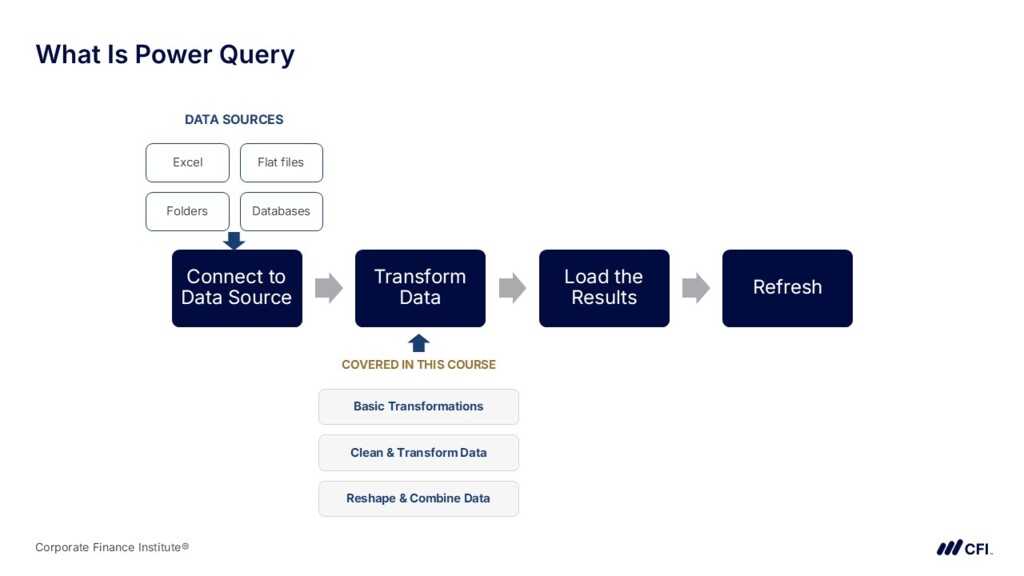
As students progress, they encounter more complex modules dedicated to cleaning and transforming messy data. This includes handling missing values, trimming stray spaces, splitting and merging columns, and standardizing date formats. In the reshaping and combining data phase, learners acquire advanced skills in unpivoting cross-tabulated reports, merging tables based on common keys, and appending multiple datasets with identical structures.
The core philosophy of these training modules culminates in building repeatable workflows. By understanding how Power Query records applied steps into an editable sequence, students learn how to design resilient pipelines that can handle fluctuating source data without breaking. The learning experience is typically capped off with practical exercises, downloadable sample files, and a qualified assessment to verify mastery of the material.
Software Requirements and Platform Accessibility
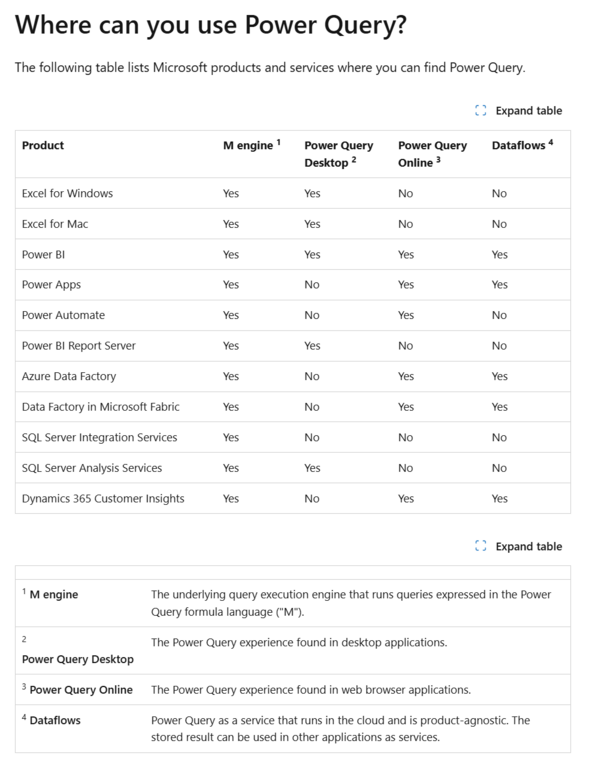
Before diving into Power Query workflows, professionals must ensure their software environment supports the required feature sets. Power Query is natively integrated into Microsoft Excel for Windows (starting with Excel 2016 and heavily expanded in Microsoft 365), Excel for Mac, and Microsoft Power BI Desktop.
However, technology analysts note that feature parity across platforms has historically been an issue. While Windows users enjoy a robust, feature-complete Power Query engine with advanced conditional columns and custom M-code editing, Mac users have faced certain limitations regarding external data connectors and advanced transformation capabilities. Microsoft has steadily worked to bridge this gap, releasing regular updates to enhance the Mac experience.
Furthermore, enterprise users operating within strict corporate IT governance frameworks may encounter restrictions regarding external data connections. Organizations often implement data loss prevention (DLP) policies that govern how employees pull data from web sources or corporate SQL servers, making it essential for analysts to coordinate with their IT departments when deploying Power Query solutions at scale.
Integration with Professional Certifications and Career Programs
The increasing reliance on automated data preparation has elevated Power Query from a niche technical skill to an essential competency for financial modelers, business analysts, and corporate accountants. Consequently, introductory Power Query modules are frequently incorporated into broader, globally recognized professional development frameworks.
Prominent credentials—such as the Data Analysis in Excel Specialization, Business Intelligence Analyst Specialization, and Financial Planning & Analysis (FP&A) Professional programs—routinely feature Power Query as a foundational prerequisite. By embedding these data engineering principles into financial and analytical certifications, training bodies acknowledge that modern financial analysis is inseparable from robust data architecture.
Additionally, many of these courses qualify for Continuing Professional Education (CPE) credits, allowing certified public accountants (CPAs) and chartered financial analysts to maintain their professional standing while upgrading their technical skill sets.
Student Demographics and Industry Impact
Feedback from participants across various industries highlights the immediate practical utility of mastering Power Query. Mid-level accountants, financial controllers, and operational analysts report significant reductions in report-generation times. Tasks that previously required hours of manual cross-referencing and VLOOKUP chains can now be executed in seconds through automated merge and append queries.
Educators and industry veterans emphasize that the transition from manual spreadsheet manipulation to automated querying represents a fundamental mindset shift. Instead of treating spreadsheets as static electronic pieces of paper, professionals learn to view them as dynamic presentation layers fed by structured, auditable data pipelines. This shift not only minimizes human error but also enhances corporate governance and auditability, as every data transformation step is transparently documented within the query editor.
Future Outlook and Broader Implications for Analytics
As artificial intelligence and advanced automation continue to reshape the corporate landscape, the foundational skills taught in introductory Power Query courses serve as a vital stepping stone toward more sophisticated data engineering and business intelligence tasks. Understanding how to structure, clean, and model relational data prepares professionals to work seamlessly with enterprise data warehouses, cloud databases, and AI-driven analytics tools like Microsoft Copilot.
Ultimately, the democratization of data preparation tools ensures that financial analysts and business professionals do not need to rely entirely on dedicated data engineering teams to clean their inputs. By empowering domain experts to handle their own data preparation through intuitive, code-light interfaces like Power Query, organizations can accelerate decision-making cycles, reduce operational friction, and foster a more agile, data-literate workforce.
Related posts: