Google is rolling out a significant enhancement to its AI capabilities within the Chrome browser on desktop, introducing a new feature called "Skills." This innovation empowers users to transform their Gemini prompts into reusable, one-click tools that can be activated across multiple selected tabs and web pages. The update represents a pivotal step in Google’s ongoing strategy to integrate advanced artificial intelligence seamlessly into its flagship browser, aiming to elevate user productivity and streamline complex digital tasks.
The Genesis of Chrome Skills: A Leap Towards Browser Automation
The introduction of Skills builds upon a foundation of progressively sophisticated AI integrations within Chrome. Over the past year, Google has steadily woven Gemini’s capabilities deeper into the browser experience, moving beyond simple conversational AI. Prior iterations included page-aware prompts, allowing Gemini to understand and interact with the content of the active tab, and multi-tab context, enabling the AI to draw information from several open pages simultaneously. Furthermore, Google connected Gemini with various applications like Gmail and Calendar, facilitating multi-step tasks such as drafting emails based on web content or scheduling events. The auto-browse feature further expanded this, enabling Gemini to perform multi-step research or data collection tasks autonomously.
Skills represent the logical culmination of these efforts, introducing a critical element: reusability. Before Skills, each interaction with Gemini, no matter how complex or well-crafted, was largely a one-off event. Users would have to re-type or carefully copy and paste their prompts for similar tasks. This new feature addresses that inefficiency by allowing any successful prompt to be saved and subsequently triggered as a dedicated "Skill." This transforms a conversational interaction into a durable, adaptable tool, fundamentally altering how users can leverage AI for repetitive or structured workflows.
Functionality and User Experience: Crafting and Deploying AI Workflows
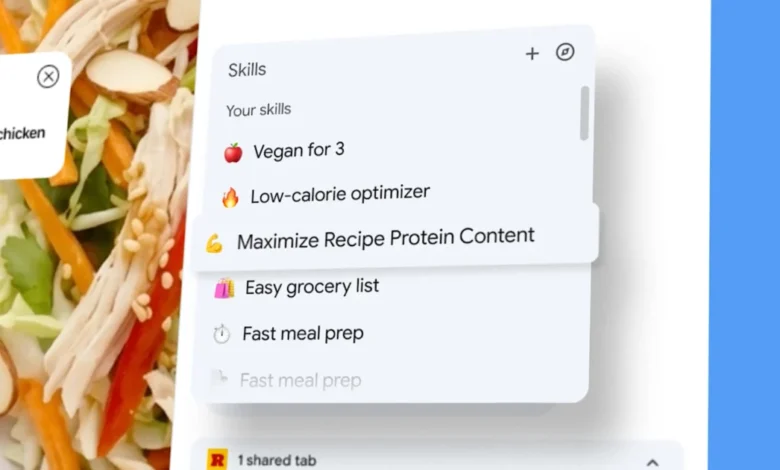
At its core, Skills simplify the execution of complex AI commands. Once a user has formulated a prompt in Gemini’s Chrome side panel and received a satisfactory response, they are presented with the option to save it as a Skill directly from their chat history. This saved Skill then becomes accessible for future use. To activate a Skill, users can simply type a forward slash (/) or click the plus sign (+) within the Gemini in Chrome interface, browse their saved Skills, and select the desired one. Upon selection, the Skill is applied to the currently viewed page.
A particularly powerful aspect of Skills is its multi-tab functionality. When initiating a Skill, users have the option to select additional open tabs, instructing Gemini to incorporate content from these multiple sources into its processing. For instance, a Skill designed to compare product specifications could be run across several e-commerce pages simultaneously, synthesizing information from each into a concise comparison. This capability moves beyond mere summarization to intelligent data aggregation and analysis across a user’s browsing context.
To kickstart user adoption and demonstrate the potential of the feature, Google is launching a curated library of pre-built Skills. These initial offerings are tailored towards common user needs in areas such as shopping, productivity, and wellness. Examples include workflows for dissecting product ingredients lists, comparing specifications across various open product tabs, or cross-referencing a gift budget with a recipient’s stated interests. Crucially, these library Skills are not static; users can add any of them to their personal collection and, more importantly, edit the underlying prompt to customize them to their specific requirements. This blend of pre-configured utility and deep customization ensures both immediate accessibility and long-term adaptability.
Strategic Context: Google’s Vision for an AI-Powered Browser
The rollout of Chrome Skills is not an isolated event but rather a strategic move within Google’s broader vision for an AI-first future. Sundar Pichai, CEO of Google and Alphabet, has consistently emphasized the company’s commitment to making AI universally helpful and integrated into daily life. Chrome, as the world’s most widely used web browser, serves as a critical conduit for delivering this vision directly to users.
The development of Gemini itself, Google’s most capable and general AI model, underscores this commitment. Launched as a multimodal AI, Gemini was designed from the outset to understand and operate across various data types, including text, code, audio, image, and video. Its integration into Chrome, initially as a conversational assistant (formerly Bard), has steadily evolved into a more proactive and embedded tool. Skills represent a significant inflection point, transitioning Gemini from a reactive chatbot to an active, personalized workflow engine within the browser.
This evolution aligns with a broader industry trend where browsers are no longer just conduits to the internet but intelligent platforms. Competitors such as Microsoft Edge, with its integrated Copilot AI, have also been pushing the boundaries of AI-enhanced browsing. Google’s approach with Skills, however, emphasizes user-created, reusable automation within the browser’s native environment, offering a distinct advantage in terms of personal customization and efficiency for recurrent tasks.
Implications for Diverse User Groups: From Consumers to Professionals
The impact of Chrome Skills is expected to resonate across a wide spectrum of users, fundamentally altering how individuals and professionals interact with the web.
For General Consumers:
Everyday tasks stand to become significantly more efficient. Imagine a user planning a trip: a Skill could be created to extract key details (dates, prices, amenities) from multiple airline and hotel booking sites, comparing them against predefined criteria. For online shopping, a Skill could summarize customer reviews for a product across different retailers or compare ingredient lists of various food items for dietary restrictions. The pre-built Skills library, with its initial focus on shopping, productivity, and wellness, explicitly targets these common consumer needs, making advanced AI accessible without requiring extensive prompt engineering knowledge.
For Professionals: SEO, Marketing, Research, and Content Creation:
The multi-tab capability and reusability of Skills unlock considerable potential for professionals whose work heavily relies on web research, data analysis, and content generation.
- SEO and Marketing Professionals: The ability to run repeatable prompts across multiple pages is a game-changer.
- Competitive Analysis: A Skill could be configured to analyze competitor landing pages, extracting their title tags, meta descriptions, heading structures, keyword density, and calls to action, then compare these against a client’s own pages or industry best practices.
- Content Auditing: Regularly auditing client websites could become significantly faster. A Skill could check for missing title tags, excessively long meta descriptions, inconsistent heading hierarchies (H1, H2, H3 usage), or the presence of specific structured data markups across a collection of URLs.
- Structured Data Extraction: For e-commerce sites or directories, a Skill could be designed to extract specific structured data (e.g., product schema, review schema) from product pages for auditing or aggregation purposes.
- Keyword Research Support: While not replacing dedicated tools, a Skill could assist in identifying related terms or user intent from forum discussions or competitor content.
- Researchers and Academics: Sifting through numerous academic papers or reports can be automated. A Skill could summarize key findings from multiple PDF tabs, extract methodologies, or identify common themes across a body of literature. This significantly reduces the time spent on literature reviews.
- Content Creators and Writers: Skills can aid in various stages of content creation.
- Content Outlining: A Skill could analyze several top-ranking articles on a topic and generate a comprehensive outline, identifying common subheadings and key points.
- Drafting and Refinement: While Gemini can already draft content, a Skill could apply specific stylistic or tonal requirements across multiple content pieces, or rephrase sentences for clarity and conciseness based on predefined rules.
- Fact-Checking (with caution): A Skill could be used to cross-reference claims made in an article against multiple authoritative sources, though human oversight remains crucial for accuracy.
- Developers and Enterprise Users: While the initial focus is consumer productivity, the underlying mechanism of reusable workflows hints at future enterprise applications. Skills could potentially be used for lightweight data extraction from internal web applications, quick checks of documentation across multiple internal wiki pages, or even basic bug report summarization if integrated with project management tools. However, the current iteration seems less geared towards a power-user API and more towards accessible automation.
Challenges and Future Outlook: Paving the Path for an AI-Native Browser
Despite the significant advantages, the successful integration and widespread adoption of Chrome Skills will depend on several factors. User education will be paramount, as many may not immediately grasp the potential of transforming prompts into reusable tools. Google will need to provide clear tutorials and compelling use cases to encourage experimentation. Furthermore, balancing the power of AI with concerns around data privacy and security will remain a critical consideration, especially as AI gains deeper access to browsing activity across multiple tabs.
Looking ahead, Skills are poised to evolve. One can envision a future where users can share their custom-built Skills, fostering a community-driven library of advanced workflows. Deeper integration with more third-party applications and services could also be on the horizon, expanding the scope of what these AI-powered workflows can achieve. The ability to chain multiple Skills together into more complex, multi-step automated processes could further blur the lines between browser functions and dedicated automation software.
Ultimately, Google Chrome Skills represent a clear trajectory for the browser: transforming it from a mere portal to the internet into a sophisticated, persistent AI assistant. By empowering users to save and reuse their AI interactions, Google is not just adding a feature; it is fundamentally redesigning the interaction model, moving towards an era where the browser proactively assists, automates, and enhances every aspect of the digital experience. This shift promises a more efficient, intelligent, and personalized journey through the vast landscape of the web.