Navigating the Facebook Verification Maze: How to Secure and Maintain Your Coveted Blue Checkmark

For brands, public figures, and digital influencers operating on Meta’s flagship social network, the constant threat of malicious impersonators remains a persistent operational challenge. Scammers frequently replicate existing profiles to siphon audiences, mislead consumers, and damage reputational equity. To combat this digital deception, platforms have long relied on authentication markers to establish digital trust. Chief among these is Facebook’s verification badge—a recognizable blue checkmark that signals to the broader public that a specific profile or business page has undergone rigorous authentication. However, securing this digital stamp of approval involves negotiating a notoriously opaque application process that frequently leaves applicants guessing about approval criteria.
Understanding the mechanics of the verification system, the specific prerequisites mandated by Meta, and the strategic operational adjustments required to maintain status can significantly elevate an applicant’s chances of acceptance. This comprehensive guide details the historical evolution of platform verification, breaks down the application workflow, outlines actionable optimization strategies, and examines the long-term implications of holding a verified digital asset.
The Evolution of Social Media Authentication and Verification
The concept of platform verification originated in 2013 when major social networks sought a reliable method to distinguish authentic public figures, major journalists, and institutional organizations from parody accounts or bad actors. Borrowing early strategies from platforms like Twitter, Facebook introduced its initial verification protocol to protect high-profile entities from identity theft.

Initially, the blue checkmark was strictly reserved for global celebrities, major media conglomerates, and prominent political figures. As platform security needs evolved, Meta expanded the availability of verification badges in 2018 to include business pages with substantial organic followings and clear public interest value. More recently, the platform extended these eligibility parameters to individual personal profiles, provided the account holder can demonstrate sufficient audience scale and ongoing public relevance.
Throughout this evolution, Meta has iteratively refined its visual identifiers. While the platform previously utilized gray checkmarks for local businesses and specific Marketplace integrations, those programs have been permanently retired to streamline user experience. Today, the blue checkmark stands as the sole universal standard for verified authenticity across both individual profiles and commercial business pages.
Step-by-Step Breakdown of the Facebook Verification Application Process
Applying for verification is technically straightforward, typically requiring users to complete a single-page request form located within Meta’s support ecosystem. However, success depends heavily on the thoroughness and accuracy of the preliminary steps undertaken by the applicant.
Step 1: Account Classification and Selection
Before submitting any documentation, applicants must log into their active Facebook account. The verification interface automatically populates a selection menu based on the user’s administrative privileges, allowing administrators to request verification for either a personal profile or a managed business page. Applicants seeking profile verification must provide the direct URL of the account in question, while page administrators must ensure their administrative roles are fully secured and up to date.

Step 2: Rigorous Identity Confirmation
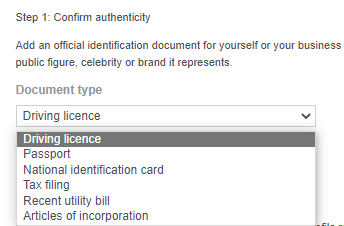
To prevent fraudulent submissions and combat widespread identity theft, Meta requires strict proof of legal identity. For individual accounts, applicants must submit government-issued identification documents, such as a valid passport, driver’s license, or national identification card. For businesses and commercial enterprises, Meta accepts official corporate documentation, including tax exemption certificates, articles of incorporation, or utility bills displaying the official business name and address. All submitted documents must be clearly scanned, legible, and match the exact naming conventions and biographical data listed on the Facebook profile or page.
Step 3: Establishing Notability and Public Interest
Authentication alone is insufficient for verification; applicants must also prove that their account holds genuine public interest and faces a credible risk of impersonation. Meta evaluates notability by analyzing category placement, regional popularity, and audience demographics. Applicants are required to select their industry category and specify the geographic regions where their brand or persona commands the highest engagement.
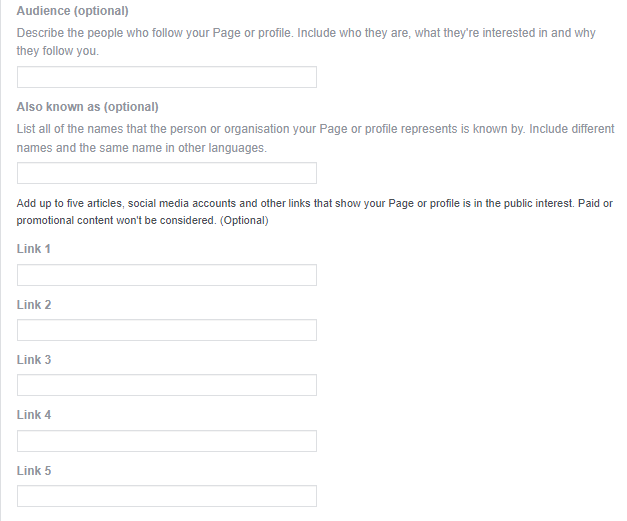
Furthermore, the application provides optional yet critical fields where users can define their core audience segments, clarify regional brand names, and submit up to five independent URLs. These external links—which can include news articles, Wikipedia entries, industry publications, or secondary social media channels—demonstrate the applicant’s broader digital footprint. Meta explicitly excludes paid promotional content, native advertisements, and self-published material from consideration during this evaluation phase.
Step 4: The Review Window and Notification Protocol
Once submitted, the application enters an internal review queue managed by Meta’s Trust and Safety teams. The review period typically ranges from 48 hours to 45 days, depending on verification volume and the complexity of the submitted documentation. Regardless of the outcome—approval or rejection—Meta delivers an official notification via email detailing the final decision. If rejected, accounts must typically wait 30 days before submitting a new application.
Six Strategies to Maximize Verification Approval Odds
Because the evaluation criteria involve subjective assessments of notability and authenticity, brands and influencers can implement proactive measures to align their digital presence with Meta’s internal standards before submitting their applications.
-
Maintain Absolute Accuracy in Organizational Data
An application containing outdated, contradictory, or unverified business information will almost certainly face rejection. Meta cross-references application data against public registries, official websites, and legal databases. Consequently, administrators must ensure that contact phone numbers, physical office addresses, support emails, and operating hours are entirely uniform across all digital touchpoints. -
Populate Comprehensive Page Details
The depth of information provided on a Facebook Page directly influences perceived notability. Brands should fully complete the About section, incorporating mission statements, founding dates, executive leadership names, and industry-specific classifications. Providing extensive background context demonstrates operational legitimacy to both human reviewers and algorithmic filters. -
Cultivate a Professional Digital Persona
The aesthetic presentation and content tenor of a Facebook page must mirror the professional standards of the real-world brand. Meta evaluates whether a page poses potential reputational risks to the platform. Administrators should audit existing content, removing posts, low-quality memes, or controversial media that could undermine public credibility. Every piece of published content should reinforce the brand’s established identity and professional standing. -
Establish Seamless Cross-Platform Linkages
Digital ecosystem consistency is a primary indicator of authenticity. Official Facebook pages must feature working, canonical links directing users to the enterprise’s primary website. Conversely, the official website must prominently display outbound links to the Facebook Page, creating a closed loop of verifiable digital ownership that confirms the legitimacy of the social property.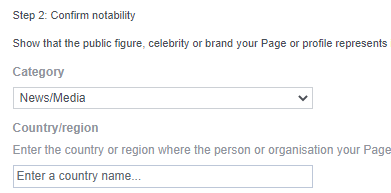
-
Utilize Dedicated Business Page Architecture
For commercial enterprises, relying on personal profiles rather than dedicated business pages introduces unnecessary administrative and verification hurdles. Setting up a formal Facebook Business Page is cost-free and provides access to advanced analytics, targeted advertising tools, and standardized business verification workflows. Business pages inherently communicate commercial intent, satisfying Meta’s structural prerequisites more efficiently than standard profiles. -
Actively Build an Engaged Community
Notability is frequently measured through audience scale, active participation, and consistent organic engagement. Brands must execute robust organic content strategies that encourage meaningful interactions, prompt constructive commentary, and foster community growth. High engagement rates and steady follower acquisition serve as quantifiable metrics proving that the account commands genuine public attention.
Best Practices for Retaining the Verification Badge Over Time
Securing a blue checkmark represents a major milestone, but verification is not a permanent, unalterable status. Meta reserves the right to revoke authentication badges if accounts violate platform policies, undergo ownership changes, or experience severe security compromises. To protect this valuable digital asset, account administrators must enforce strict operational safeguards.
Enforce Advanced Account Security Protocols
Verified accounts are prime targets for sophisticated cybercriminals seeking to hijack established audiences for malicious campaigns. To mitigate this vulnerability, administrators must immediately enable two-factor authentication (2FA). By requiring secondary verification mechanisms—such as authentication app codes, hardware security keys, or text message confirmations—organizations make unauthorized access exponentially more difficult for external threat actors.
Strict Compliance with Community Standards and Intellectual Property Policies
Verified status does not grant immunity from platform regulations. Account holders must rigorously adhere to Facebook’s Community Standards, maintaining strict compliance regarding hate speech, harassment, dangerous organizations, and misinformation. Furthermore, verified pages frequently curate third-party content to boost engagement; administrators must ensure that all shared media strictly complies with platform intellectual property rights and digital privacy laws to avoid punitive badge removals.
Maintain an Ongoing Strategic Marketing Presence
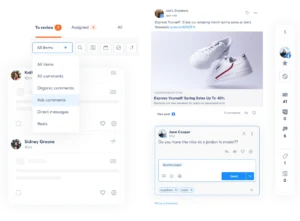
Because sustained popularity remains a baseline requirement for verified accounts, passive digital management can jeopardize status over time. Organizations should integrate their Facebook presence into broader multi-channel marketing campaigns. Utilizing a centralized social media management dashboard—such as Hootsuite—allows marketing teams to streamline content creation, schedule promotional campaigns efficiently, monitor real-time audience engagement, and measure the return on investment of all digital outreach efforts. By combining rigorous adherence to Meta’s security guidelines with consistent community building, brands can successfully secure and indefinitely maintain their position among the platform’s authenticated elite.