Stop Processing the Same Work Twice: A Strategic Guide to Eliminating Mental Clutter and Optimizing Workflow

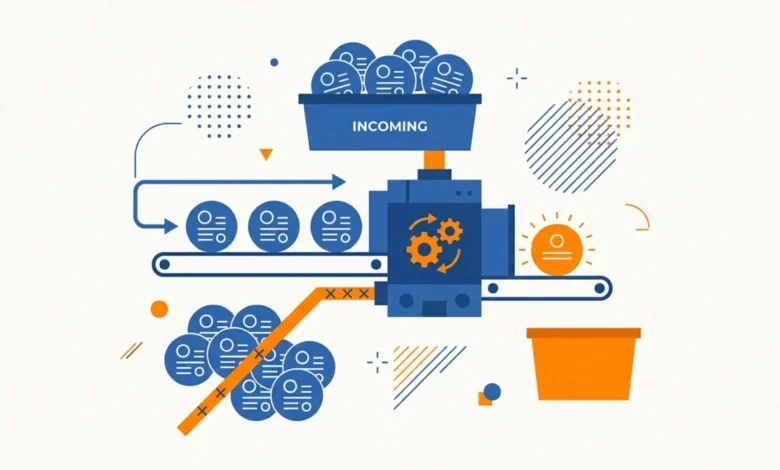
The modern professional landscape is defined by an unprecedented volume of incoming information, much of which arrives in the form of emails, digital documents, and instant messages. Research from the University of California, Irvine, has indicated that the average knowledge worker is interrupted or switches tasks every three minutes, a phenomenon that significantly exacerbates "decision fatigue." When an email or digital file is opened, reviewed, and subsequently closed without a definitive action being taken, it creates an "open loop." These loops, according to cognitive science experts, impose a persistent mental tax, forcing the brain to re-process the same information repeatedly during future review cycles. This inefficiency is not merely a minor inconvenience; it is a systemic drain on institutional and individual productivity.
The Psychology of Decision Avoidance
The root cause of this accumulation is often identified as a failure to execute the "touch it once" principle. In a high-velocity environment, the temptation to defer a decision regarding a communication or document is high. However, studies on cognitive load suggest that the energy required to "re-learn" the context of a message during a second or third review is nearly identical to the energy required to make an initial decision.
Chronologically, the escalation of this issue typically follows a predictable pattern: the arrival of an item, the initial brief review, the act of "snoozing" or closing the item, and the subsequent psychological clutter that accumulates over a standard work week. By the end of a typical five-day cycle, the sheer volume of unresolved tasks creates a state of professional paralysis. Experts in organizational behavior argue that this behavior is a form of procrastination that masquerades as busyness. The implication is clear: the work has not become more difficult; rather, the decision-making process has been artificially fragmented.
Implementing Tactical Review Cycles
To mitigate the buildup of mental clutter, organizational efficiency consultants emphasize the necessity of structured, ritualized processing. The industry standard has moved toward a bifurcated approach: the Weekly Review and the Monthly Strategic Audit.
The Weekly Review is designed specifically for tactical operations—clearing the inbox, filing documents, and confirming the immediate action items for the upcoming five business days. This session should remain focused on execution rather than long-term planning to ensure the process remains efficient. Conversely, the Monthly Review serves as a high-level strategic "zoom-out." During this period, professionals analyze the previous 30 days of activity, evaluate performance against set objectives, and establish a single, overarching theme or intention for the month ahead. By separating tactical maintenance from strategic planning, organizations can reduce the cognitive friction that often leads to burnout.
The Role of Automation and Template Standardization
A significant portion of recurring professional work is repetitive by nature. Standardized responses, report formats, and project kickoff documents often consume a disproportionate amount of time due to the need to "re-invent" the structure each time.
Data from productivity software developers suggest that up to 80% of routine professional communication consists of stock language or recurring structural elements. By utilizing a "template-first" approach—where the structure, headings, and foundational language are pre-defined—workers can dedicate their limited cognitive bandwidth to the remaining 20% of the content that requires original input. When integrated with text-expansion software, which automates the insertion of boilerplate text, the time required to process routine inquiries can be reduced by as much as 60%. This shift from manual drafting to modular content creation represents a fundamental change in how information is synthesized and distributed.

Enhancing Workflow with Specialized Tools
The digital ecosystem currently offers a variety of tools designed to reduce friction in file management and multi-step task execution. "Shelf" applications, which allow for the staging of files in a dedicated menu bar area, prevent the loss of focus that occurs when users navigate through complex file directories. This effectively serves as a digital clipboard, allowing for the rapid movement of assets between applications.
Furthermore, the rise of macro-automation hardware, such as stream decks and programmable pads, has allowed professionals to execute complex, multi-step workflows with a single input. These devices can simultaneously open necessary software, organize browser tabs, and initiate specific reporting tools, thereby eliminating the "assembly time" required to enter a productive state. For those who remain visual thinkers, traditional tools like whiteboards continue to provide an essential low-tech interface for brainstorming, proving that analog methods often complement, rather than compete with, digital efficiency.
Structural Adjustments: The 45-15 Rule
The practice of scheduling back-to-back meetings is widely cited as a primary driver of the "productivity hangover." Without inter-meeting intervals, the ability to synthesize information from one discussion before entering another is severely compromised. To combat this, industry leaders are increasingly adopting the "45-15 rule." This scheduling protocol mandates that a 60-minute meeting be restricted to 45 minutes of active discussion, with the remaining 15 minutes reserved for documentation and follow-up.
This buffer period is critical for capturing action items while the context of the conversation is still fresh. Without this gap, the probability of forgotten tasks or misaligned expectations increases exponentially. However, even with buffered schedules, disruptions occur. Proactive planning for these "gaps"—such as pre-identifying a "Plan B" task—ensures that if a meeting is canceled or concludes early, the time is used for high-value work rather than passive consumption.
AI Integration and Knowledge Retention
In the era of AI-native tooling, the capture of information during learning processes has evolved. Traditional methods of manual note-taking during meetings or while consuming professional development materials often force a user to exit their "flow state." Modern AI-native tools now allow for the real-time capture of insights via voice-to-text, automated highlighting, and intelligent tagging.
These platforms do not simply store information; they make it searchable and accessible for future retrieval, turning passive consumption into an active, growing knowledge base. By automating the capture process, professionals can maintain focus during learning sessions while ensuring that critical insights are preserved for long-term application.
Broader Implications and Future Outlook
The cumulative effect of these small, strategic adjustments is substantial. By eliminating repetitive processing, standardizing documentation, and optimizing scheduling, the modern professional can reclaim significant portions of their work week. The implications for organizations are equally profound: a reduction in decision fatigue leads to higher quality output, improved employee morale, and a more resilient operational framework.
As the volume of information continues to expand, the ability to process that information efficiently will become a core competency for all knowledge workers. The transition from a reactive, "inbox-driven" workflow to a proactive, "system-driven" workflow is no longer an optional optimization; it is a necessity for maintaining relevance and effectiveness in a competitive digital landscape. Those who successfully master the art of the "single touch" and leverage the power of automation will be best positioned to navigate the complexities of the modern, information-heavy economy.